
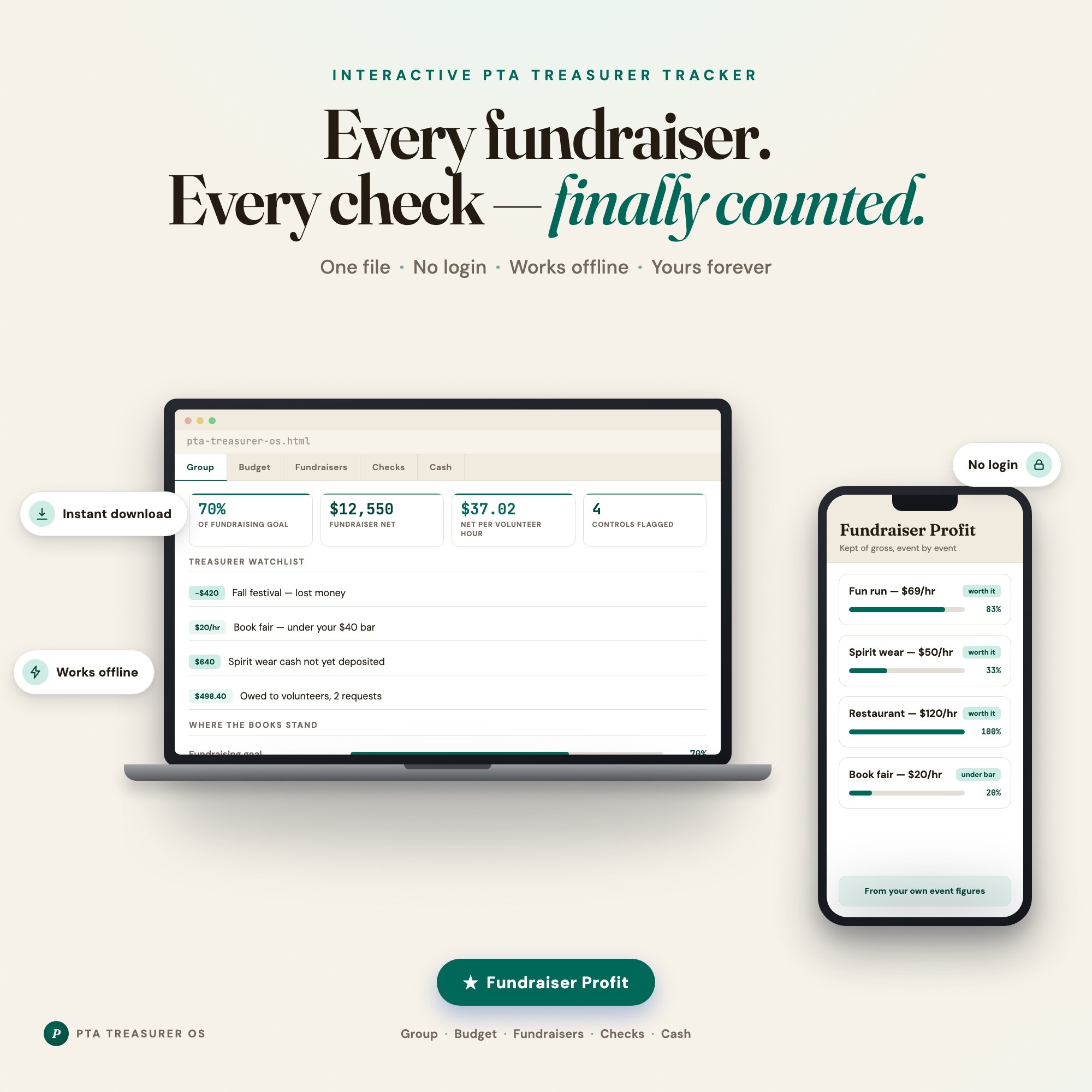
Interactive dashboard
PTA Treasurer OS
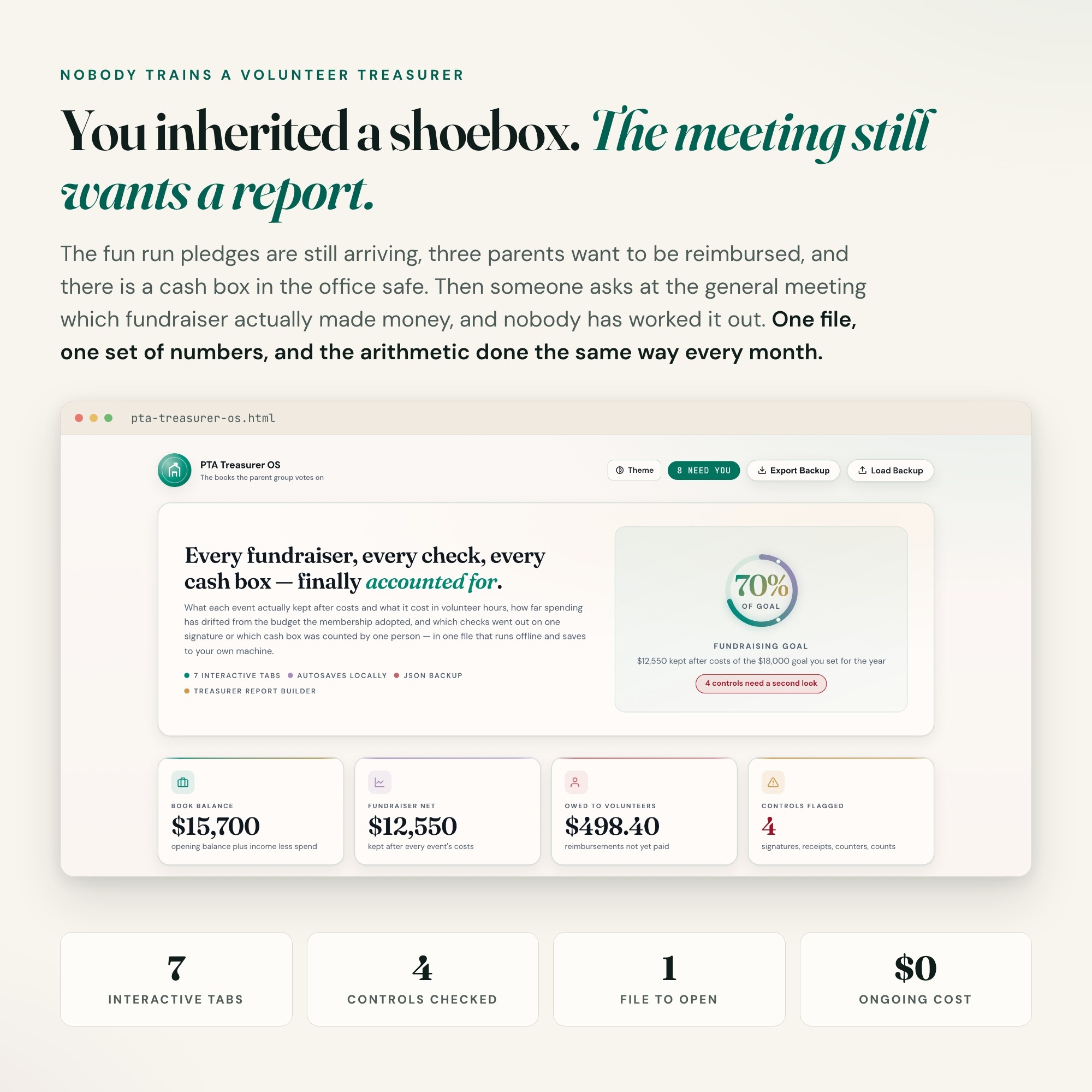
Built for Volunteer treasurers of PTAs, PTOs, booster clubs and scout troops — who said yes at the spring meeting, inherited a shoebox, and now have fundraiser money, reimbursement requests and a cash box arriving faster than they can log it
Try it live
Click around the real dashboard
Interactive demo · a few tabs unlocked
See it in action
The dashboard
What it is
Built for volunteer treasurers of PTAs, PTOs, booster clubs and scout troops — who said yes at the spring meeting, inherited a shoebox, and now have fundraiser money, reimbursement requests and a cash box arriving faster than they can log it. Every fundraiser. Every check — finally counted. It is a browser-native interactive dashboard that lives in a single HTML file, with nothing to install.
What is PTA Treasurer OS?
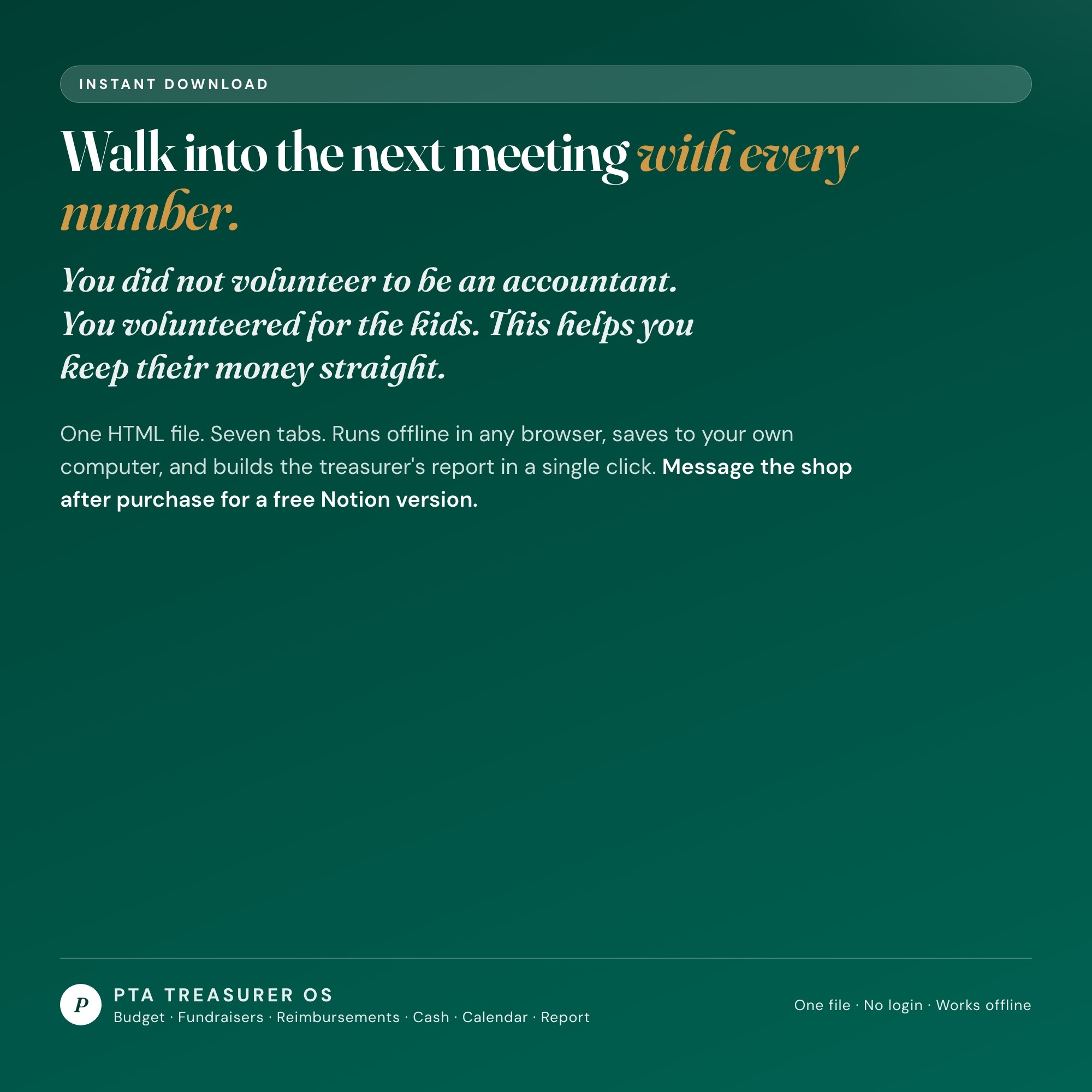
PTA Treasurer OS is an interactive dashboard that opens in your web browser. It is one self-contained HTML file — you download it once, double-click it, and it runs. It is built for volunteer treasurers of PTAs, PTOs, booster clubs and scout troops — who said yes at the spring meeting, inherited a shoebox, and now have fundraiser money, reimbursement requests and a cash box arriving faster than they can log it.
What is included in PTA Treasurer OS?
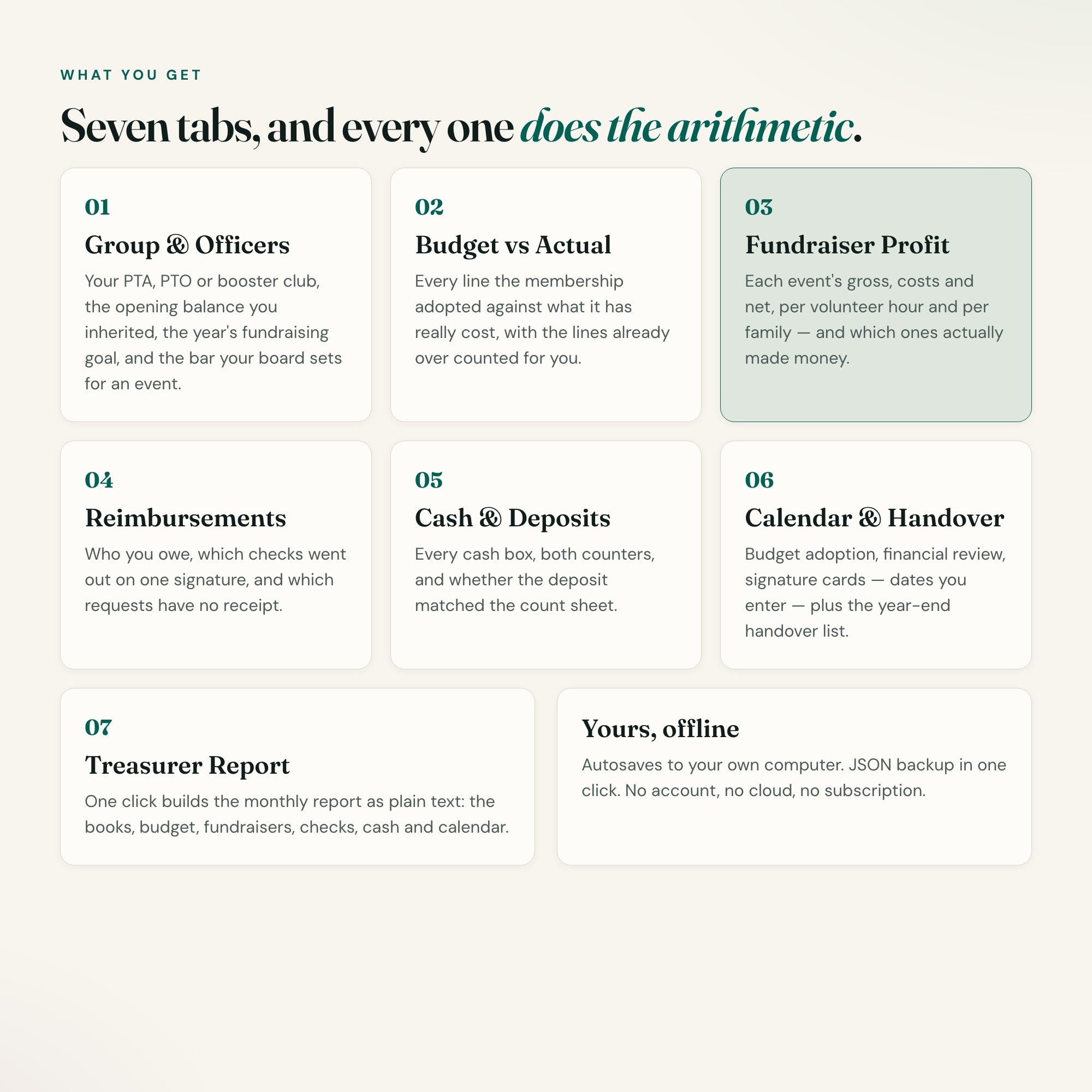
7 sections, all in the one file:
- Group & Officers
- Budget vs Actual
- Fundraiser Profit
- Reimbursements
- Cash & Deposits
- Calendar & Handover
- Treasurer’s Report
Does PTA Treasurer OS need Excel, Google Sheets or a subscription?
No. There is no app to install, no account to create, no login and no recurring fee. It opens in Chrome, Safari, Edge or Firefox on macOS, Windows, iPad or Chromebook, and it keeps working offline once the file is on your machine.
Where does PTA Treasurer OS store my data?
On your own device, in your own browser. Nothing is uploaded, no account is created and no analytics are collected. You can export a backup file at any time and load it on another computer.
Can I change how PTA Treasurer OS looks?
Yes — colour, background, typeface and text size are all adjustable from inside the dashboard, and your choice is remembered the next time you open it.
How much is PTA Treasurer OS and how is it delivered?
$26, delivered as an instant download the moment you pay. Because it is a digital file, all sales are final.
More about PTA Treasurer OS
The school year just started, fundraiser season is here, and you are the new treasurer holding the parents’ money. Nobody handed you a system — just a checkbook, a cash box and last year’s spreadsheet.
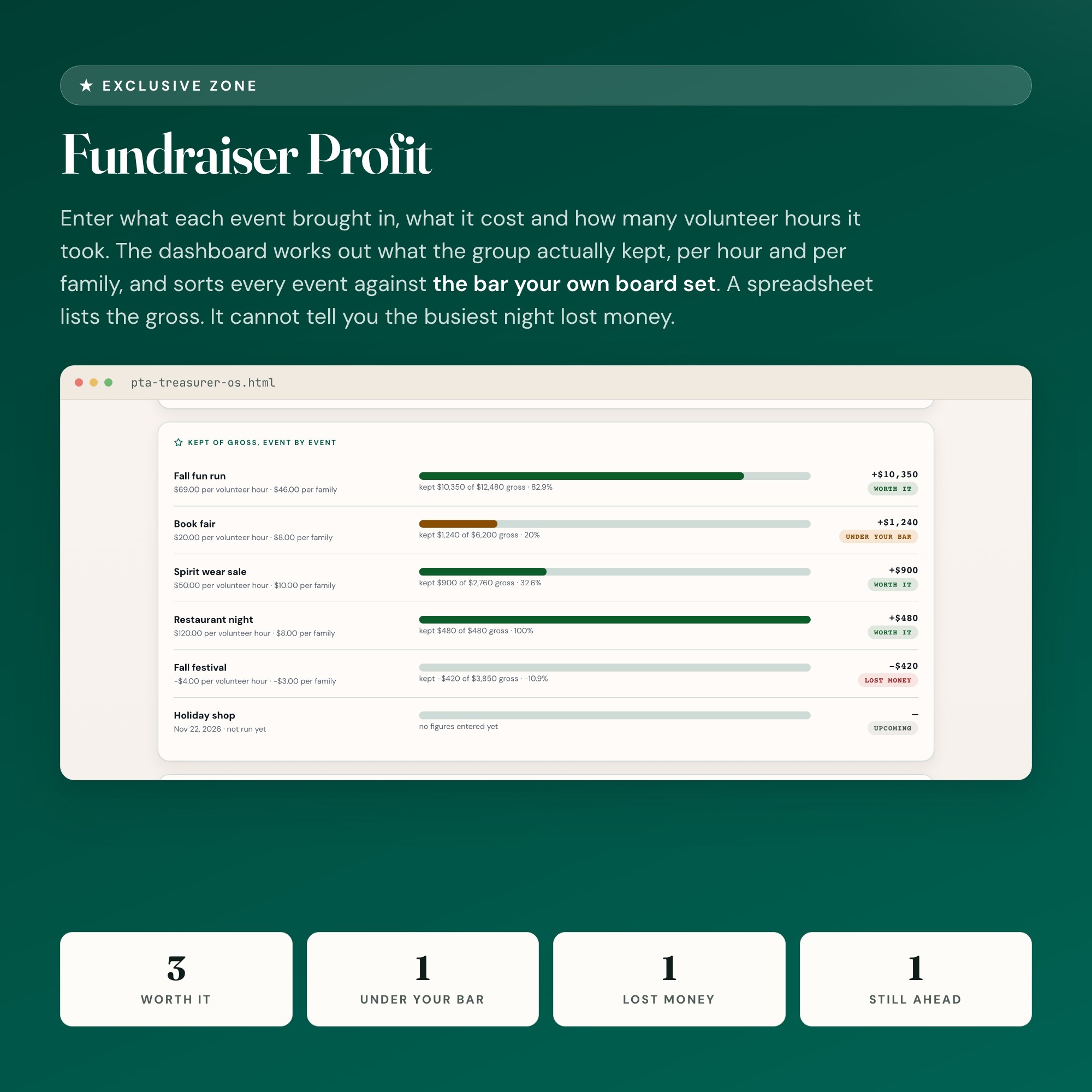
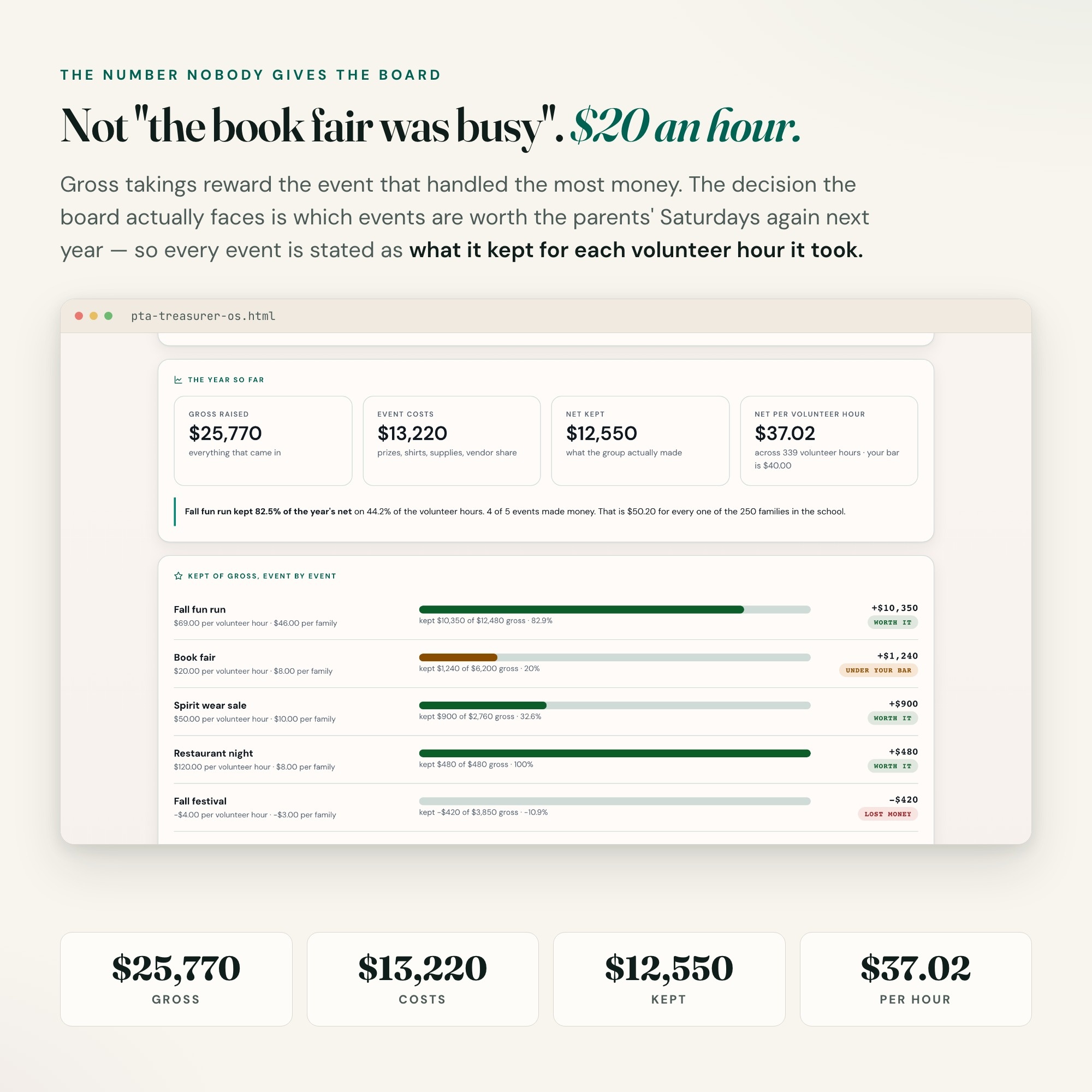
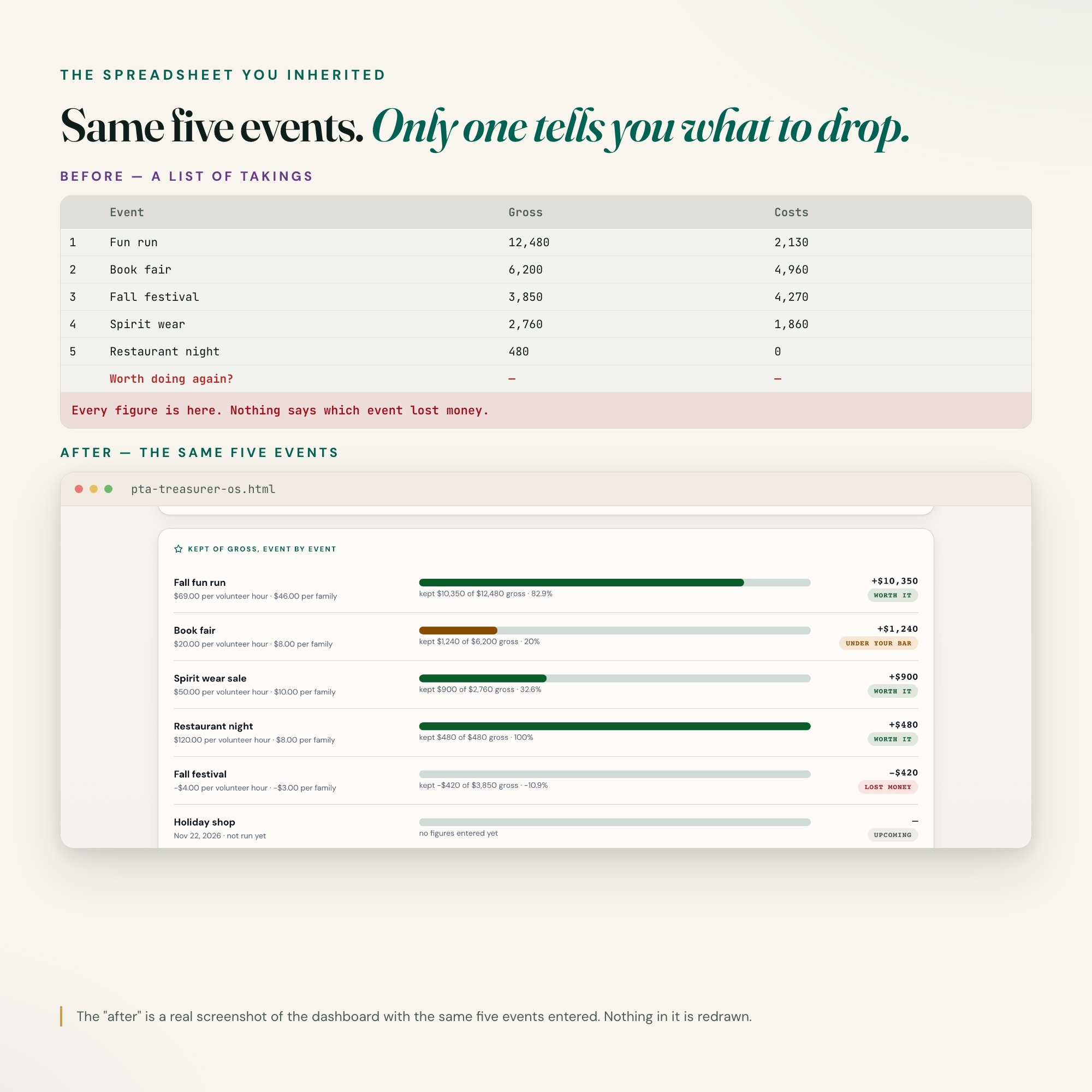
★ EXCLUSIVE ZONE: Fundraiser Profit. Every PTA treasurer tool in this niche lists what each fundraiser brought in. This one tells you what it actually KEPT. Enter each event’s gross, its costs and the volunteer hours it took, and the dashboard works out the net, the share of the gross the group kept, the net per volunteer hour and the net per family — then sorts every event against the per-hour bar your own board sets. The fun run that carried the year, the book fair that was busy but kept 20%, the festival that lost money once the costs came in: all on one screen before you book next year’s calendar. Every other PTA, PTO and booster club treasurer product on page one is an Excel workbook, a Google Sheet or a printable. A spreadsheet lists the gross. It cannot tell you which event is worth the parents’ Saturday.
WHAT’S INSIDE
This interactive HTML dashboard runs in any browser — double-click, start tracking:
Tab 1 — Group & Officers: Your PTA, PTO, booster club or scout troop, the opening balance you inherited, the year’s fundraising goal, the per-hour bar for an event, and the check amount above which your bylaws want two signers. Every number is one you enter.
Tab 2 — Budget vs Actual: Every line of the budget your membership adopted, what it was budgeted at and what it has actually cost, with the lines already over counted for you and the book balance worked out from your opening balance.
Tab 3 — ★ Fundraiser Profit: The exclusive zone. Gross, costs, net, kept-of-gross, net per volunteer hour and net per family for every event, banded against your own bar, with the year’s total measured against your fundraising goal on the ring at the top.
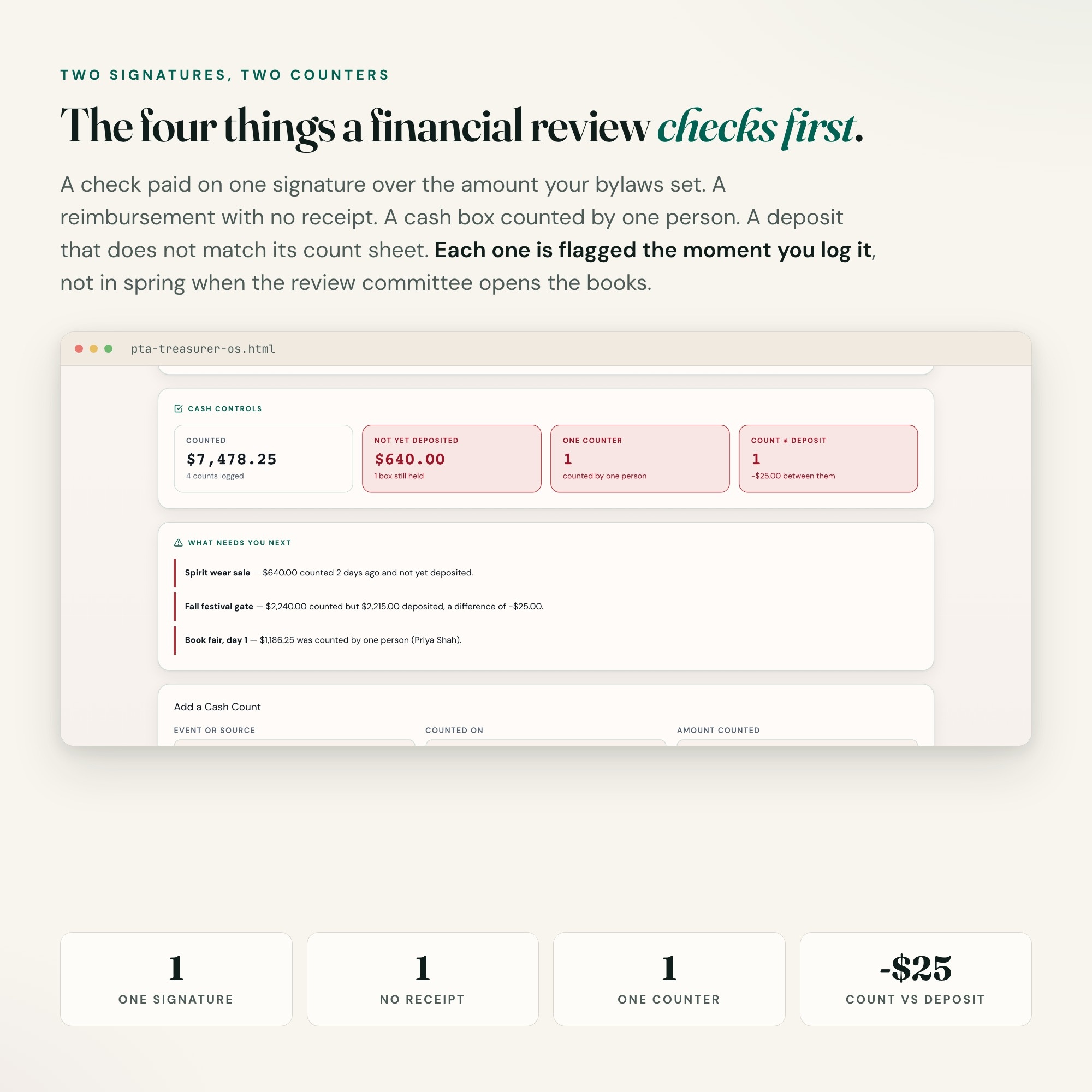
Tab 4 — Reimbursements: Every volunteer you owe, every check written, and the two things a financial review looks for first: a check paid on one signature, and a request with no receipt.
Tab 5 — Cash & Deposits: Every cash box with both counters’ names, what was counted against what reached the bank, cash still being held, and any deposit that does not match its count sheet.
Tab 6 — Calendar & Handover: Budget adoption, bank signature cards, the financial review, insurance and the year-end handover. Every date ships blank because your bylaws and your accountant set them, not a template. Plus a year-end handover checklist for the next treasurer.
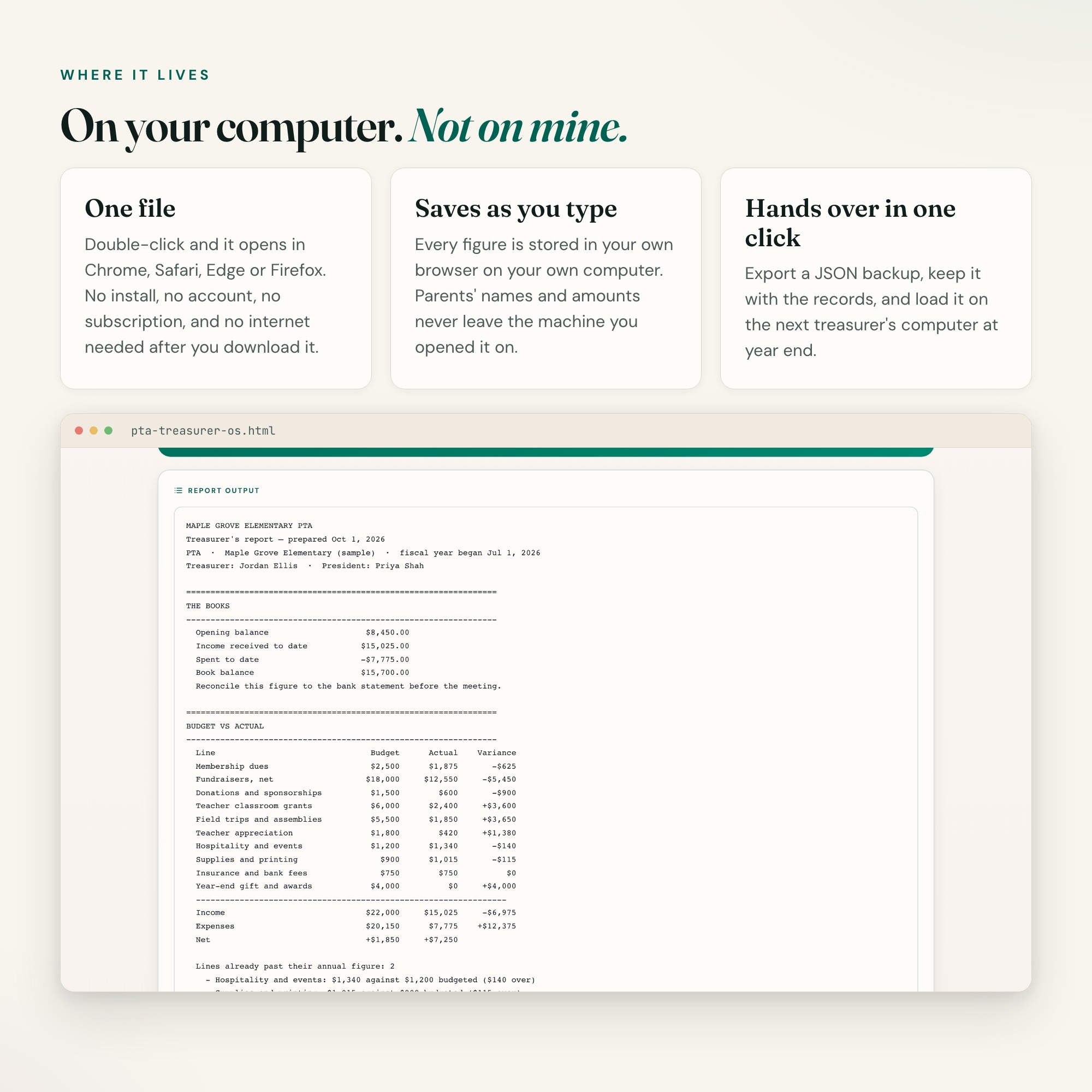
Tab 7 — Treasurer Report: One button builds the monthly treasurer’s report as plain text — the books, budget vs actual, fundraiser profit, reimbursements, cash and the calendar — ready to paste into the agenda, the minutes or an email.
THIS IS FOR YOU IF
-
You said yes to treasurer at the spring meeting and just inherited the books for the new school year
-
It is fundraiser season and the money is arriving faster than you can log it
-
Someone asked which fundraiser actually made money and you only had the gross
-
You want two signatures on every check and two counters on every cash box
-
You present a treasurer’s report every month and build it by hand every time
-
You keep the books for a PTA, PTO, booster club or scout troop and want the next treasurer to find them in order
HOW IT WORKS
One file. Double-click it and it opens in Chrome, Safari, Edge or Firefox. It saves to your own computer as you type — no login, no account, no subscription, no internet needed after download. Export a JSON backup whenever you want and load it on the next treasurer’s computer at handover. Four-way theme control: colour, background, typeface and text size.
WHAT IT IS NOT
This is a treasurer’s working tracker. It is not an audit, not a financial review, and not tax or legal advice. It knows no IRS rule, no state filing requirement and no provision of your bylaws, and it sets no threshold of its own — which annual filing applies to your group, if any, is a question for your accountant or your state or national organization. Every figure, every signature amount, every goal and every date is one you enter. It does the arithmetic on what you enter and supplies no rules.
FILES INCLUDED
dashboard.html (the interactive dashboard) and HOW-TO-SAVE.txt (saving, backup and handover guide), delivered as one ZIP.
FREE NOTION VERSION
Prefer to work in Notion? Message the shop after your purchase and I will send you a Notion version of this dashboard at no extra cost. This is my first Notion integration — if anything is off, reach out and I will fix it.
You did not volunteer to be an accountant. You volunteered for the kids. This helps you keep their money straight.
INSTANT DOWNLOAD — all sales are final on digital items.
5 Tabs included
- ◈
Group & Officers
The group, the opening balance, this year's fundraising goal and the bar your board set
- ≡
Budget vs Actual
Every line of the adopted budget against what has actually come in and gone out
- ⊞
Fundraiser Profit
EXCLUSIVE: each event's gross, costs, net, net per volunteer hour and per family, and which events actually made money
- ◉
Reimbursements
Who is owed, which checks went out on one signature, which requests have no receipt
- ★
Cash & Deposits
Every cash box, both counters, and whether the deposit matched the count sheet
Exclusive Feature
Fundraiser Profit — enter what each event brought in, what it cost and how many volunteer hours it took; the dashboard works out what the group actually kept, per hour and per family, and sorts every event against the bar your own board set. A spreadsheet lists the gross; it cannot tell you the busiest night lost money.
This is built into the fifth tab and is unavailable in any static template, spreadsheet, or Notion template on the market.
Gallery

Learn more
Before you buy
Frequently asked questions
- What is PTA Treasurer OS?
- PTA Treasurer OS is an interactive dashboard that opens in your web browser. It is one self-contained HTML file — download it once, double-click it, and it runs. No app, no account, no subscription.
- Does PTA Treasurer OS need Excel or Google Sheets?
- No. It is not a spreadsheet and does not open in one. It runs in Chrome, Safari, Edge or Firefox on macOS, Windows, iPad or Chromebook, and keeps working offline.
- What is included in PTA Treasurer OS?
- 7 sections in a single file: Group & Officers, Budget vs Actual, Fundraiser Profit, Reimbursements, Cash & Deposits, Calendar & Handover, Treasurer's Report.
- Can I change the colours and text size in PTA Treasurer OS?
- Yes. Colour, background, typeface and text size are adjustable from inside the dashboard, and the setting is remembered.
- Does it work offline?
- Yes — completely. The dashboard is a single HTML file. Once downloaded, it runs entirely in your browser with no internet connection needed. All data autosaves to your browser's localStorage.
- Which devices and browsers are supported?
- Works in Chrome, Edge, Safari, and Firefox on macOS, Windows, iPad, and Chromebook. No app to install, no account to create. Just open the file.
- What is your refund policy?
- All sales are final. This is an instant download delivered in full at payment, so it cannot be returned. If a file will not open or a feature does not work as described, that is a defect and it gets fixed at no cost — email hello@listingresearchos.com and you will get a corrected file.
- How do I install it?
- There is nothing to install. After purchase, download the HTML file. Double-click to open in your browser. That's it. A HOW-TO-SAVE.txt is included explaining how to back up and restore your data.
- Is my data private?
- Completely. Everything runs locally — no login, no analytics, no data sent to any server. Your data is stored only in your browser's localStorage. You own it entirely.
You might also like
One-time purchase
Get it for $26.00
Instant download. Open in any browser. Yours forever.