
Teachable vs. Kajabi vs. an Offline Launch Dashboard: What You Actually Need
Teachable vs. Kajabi vs. Podia vs. Course Launch OS: which tool hosts your course, which one plans your launch, and why you probably need both.
Published June 3, 2026
Our verdict
Teachable, Kajabi, and Podia are course hosting platforms. The Course Launch OS is a launch planning tool. They're not competing — but most first-time creators confuse the two and end up paying for a $149/month Kajabi plan while their actual launch plan is a sticky note. Get the planning right first, then pick your hosting platform.
First-time course creators get this question wrong because the tools solve different problems. Teachable, Kajabi, and Podia are course hosting platforms — they deliver your video lessons to students, process payments, and manage enrollments. A course launch dashboard is a planning tool — it helps you build the module structure, model your revenue math, map your 12-week pre-launch timeline, and generate onboarding emails before you open the cart.
Most creators pick a hosting platform first and plan the launch second. That’s backwards.
The Hosting Platform Decision: Teachable vs. Kajabi vs. Podia
Teachable ($39–$119/month)
Teachable is the most popular standalone course hosting platform. Clean student experience, good video delivery, solid sales page templates, and a straightforward checkout flow. The basic plan at $39/month takes a 5% transaction fee; paid plans eliminate that. Teachable doesn’t include email marketing or a website builder — you’ll use ConvertKit or Mailchimp alongside it.
Best for: Creators who want focused course hosting without the complexity or cost of an all-in-one platform.
Kajabi ($149–$399/month)
Kajabi bundles course hosting, email marketing, a website builder, landing pages, and sales funnels into one platform. If you’re running a business with multiple products, an active email list, and ongoing launches, Kajabi’s integration can be worth the premium. For a first-time creator building their first course, it’s often more platform than the launch requires — and $149/month before you’ve made a dollar is a significant bet.
Best for: Established creators with multiple products who want everything in one system and can justify the price.
Podia ($33–$89/month)
Podia sits between Teachable and Kajabi in price and features. It includes courses, digital downloads, coaching products, and a basic community, with no transaction fees on any plan. The interface is beginner-friendly, and the lower price makes it a reasonable starting point for first-time creators.
Best for: First-time creators who want a clean all-in-one at lower cost, willing to add a separate email tool.
What None of These Platforms Do Before Launch
Here’s the gap most creators discover at the wrong moment: none of these platforms help you figure out if your launch math works before you open the cart.
How many students do you need to enroll to break even on your launch costs? If your email list is 1,500 people with an average 30% open rate and a 2% sales-page conversion, what’s your realistic first-cohort revenue? What do you say in day 1, day 7, and day 30 onboarding emails? What happens in week 8 of your 12-week pre-launch if you’re behind on module recording?
Kajabi doesn’t model that. Teachable doesn’t model that. You figure it out in a spreadsheet, or you don’t figure it out at all and launch hoping the numbers work out.
Course Launch OS: The Launch Planning Layer
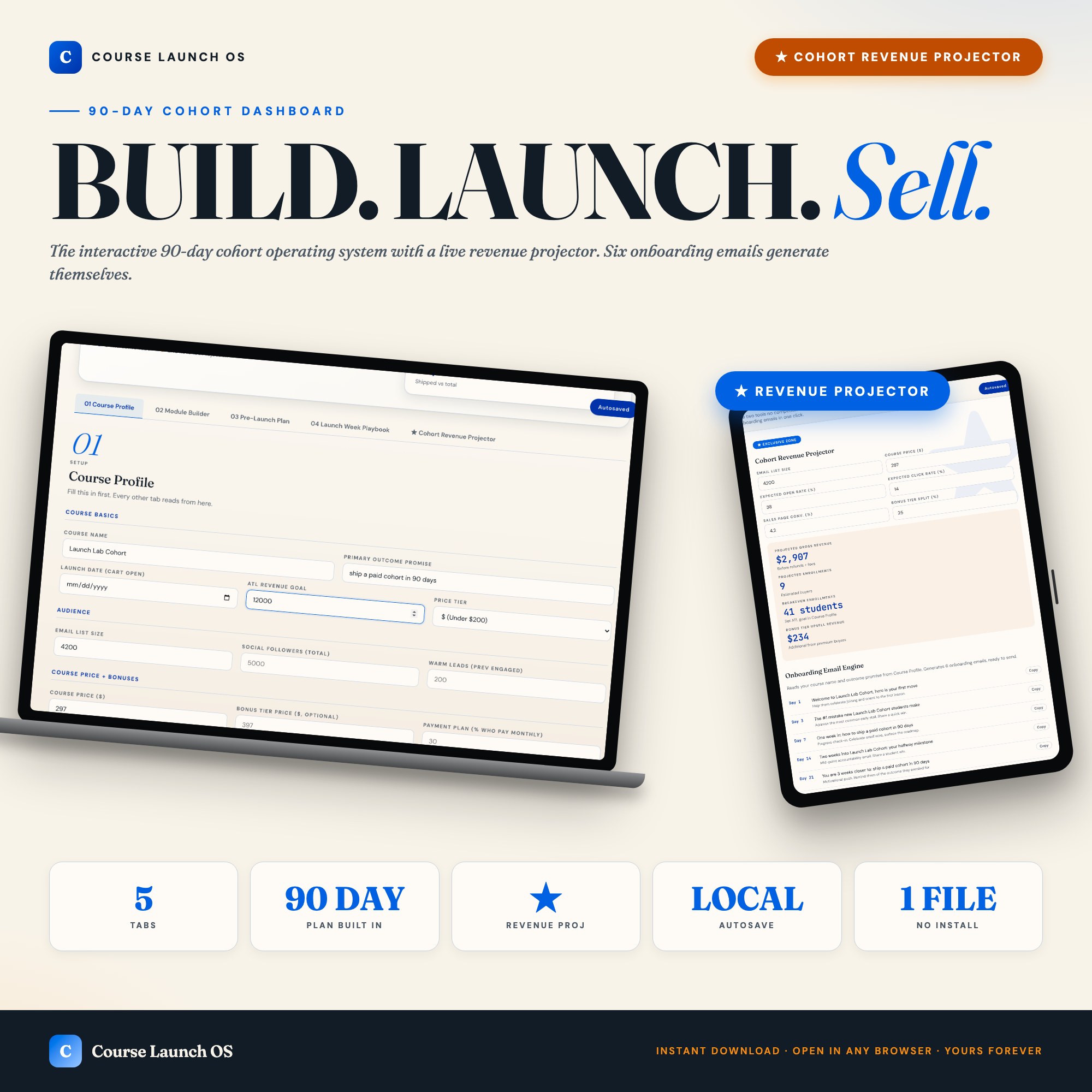
The Course Launch OS is a single offline HTML file built for the 90-day window before cart open. Five tabs cover the full planning process:
The Course Profile tab holds your course name, outcome promise, audience size, price tier, and launch date — and every other tab reads from it. The Module Builder lets you map your modules and lessons with status tracking (draft / recording / edited / shipped). The Pre-Launch Plan is a 12-week editable grid that auto-highlights the current week based on your launch date. The Launch Week Playbook gives you a day-by-day plan for Monday through Sunday of launch week, including email subjects, social copy, and DM sequences.
The Cohort Revenue Projector tab is the differentiator no other tool ships: you enter your expected open rate, click rate, and sales-page conversion percentage, and the dashboard reads your audience size and price tier from the Course Profile to output your projected gross revenue, breakeven enrollment count, and bonus-tier upsell math — live, updating as you change any input. The same tab’s Onboarding Engine generates ready-to-copy email subjects and one-line bodies for days 1, 3, 7, 14, 21, and 30 based on your course name and outcome promise.
At $26 one-time, it’s not a hosting platform replacement. It’s the planning layer that Kajabi and Teachable skip.
How They Work Together
The practical answer for most first-time creators:
- Use the Course Launch OS to plan the launch, model the revenue math, build the module structure, and generate the onboarding sequence.
- Pick Teachable or Podia to host the course and process payments.
- Use ConvertKit or a similar tool for your email list.
You don’t need Kajabi’s $149/month plan for a first launch. You need a clear plan and the math worked out before cart open.
Frequently asked questions
- What is the difference between Teachable and Kajabi?
- Teachable ($39–$119/month) is a course hosting platform focused on delivering video content to students. Kajabi ($149–$399/month) bundles course hosting with email marketing, a website builder, and sales funnels. Kajabi is more powerful but significantly more expensive. Neither one plans your launch — they host the course after you've built it.
- Do I need Kajabi to make $10K with my first course?
- No. Many successful first launches run on Teachable or even Gumroad for hosting, with a separate email service like ConvertKit. The revenue comes from your audience and your launch execution, not which platform hosts the videos.
- What does a course launch planning dashboard do that Kajabi doesn't?
- Kajabi shows you enrollments and revenue after launch. A launch planning dashboard helps you model the revenue math before you open the cart — projecting gross revenue, breakeven enrollment count, and bonus-tier math based on your audience size and conversion assumptions. The Course Launch OS Cohort Revenue Projector does exactly this.
- Is Podia cheaper than Teachable?
- Podia starts at $33/month and includes courses, digital downloads, and a basic community. No transaction fees. It's a solid choice for creators who want a simple all-in-one at lower cost than Kajabi.
- What if I haven't built my course yet — which tool should I start with?
- Start with the Course Launch OS to plan the launch, model your revenue, build your module structure, and create your 12-week pre-launch timeline. Pick your hosting platform (Teachable or Podia for most first-timers) once you know your price point and audience size.
The winner: interactive dashboards
No spreadsheet. No subscription. One HTML file that runs offline in your browser.
ListingResearchOS Shop
Stop comparing — start using
Interactive dashboards. One-time purchase. No subscriptions. Works offline.
Browse all dashboards →