
How Service-Based Solopreneurs Manage Client Bookings Without Expensive Software
A practical booking system for photographers, cleaners, coaches, and dog walkers — manage clients, invoices, and re-bookings in one offline dashboard.
Published June 3, 2026
You take bookings in your DMs, track payments in a spreadsheet you rarely open, and rely on memory to know which clients are overdue for a re-book. That system works until it doesn’t — and the moment it fails is usually a busy week when you can least afford the chaos.
This guide lays out a practical booking management approach for service solopreneurs: photographers, house cleaners, coaches, dog walkers, makeup artists, and professional organizers. No subscription required.
The Four Things Your Booking System Actually Needs to Track
Most booking problems aren’t caused by missing software. They’re caused by scattered information. Before evaluating any tool, get clear on what your system needs to contain:
1. A client roster with contact context. Not just names and numbers — you need to know how each client found you, what service type they normally book, and any special notes. This is what lets you personalize a re-booking message six months later instead of sending something generic.
2. A booking log with financial detail. Each booking needs its date, service, duration, deposit paid, and balance due. When a client asks “did I pay you in full?” you need a one-second answer, not a hunt through your bank app.
3. A service delivery checklist. Whether you’re a photographer with a shot list or a house cleaner with a room-by-room protocol, consistent delivery comes from a checklist you actually run. Memory shortcuts create the uneven experiences that don’t get five-star reviews.
4. An invoice record. You need to see, at a glance, who owes you money across all active clients — not per booking, but in aggregate. Tax season gets much simpler when this data is already organized by client.
Building the Re-Booking Habit
The most valuable thing a service business can do is turn one-time clients into repeat revenue. Most solopreneurs know they should follow up — but the timing is inconsistent and the message is usually an afterthought.
The key is building re-engagement into your workflow at the point of service completion, not later when memory has faded. When you mark a job done and log the invoice as paid, that’s the exact moment to record the ideal re-booking window for that client. A house cleaner re-books in four weeks. A portrait photographer re-books in six months. A dog walker re-books before the client’s next vacation.
When those intervals are logged upfront, you can generate a targeted re-engagement message at the right moment — specific to the client’s service history — rather than a generic “hey, want to book again?” blast.
Why a Single Browser File Beats a Patchwork of Apps
The common alternative — a booking app plus a separate invoicing app plus a notes app — creates a problem of its own: information lives in three places, none of which talk to each other. When you’re trying to answer “which clients are overdue for a re-book AND have an outstanding balance?” you’re manually cross-referencing three tabs.
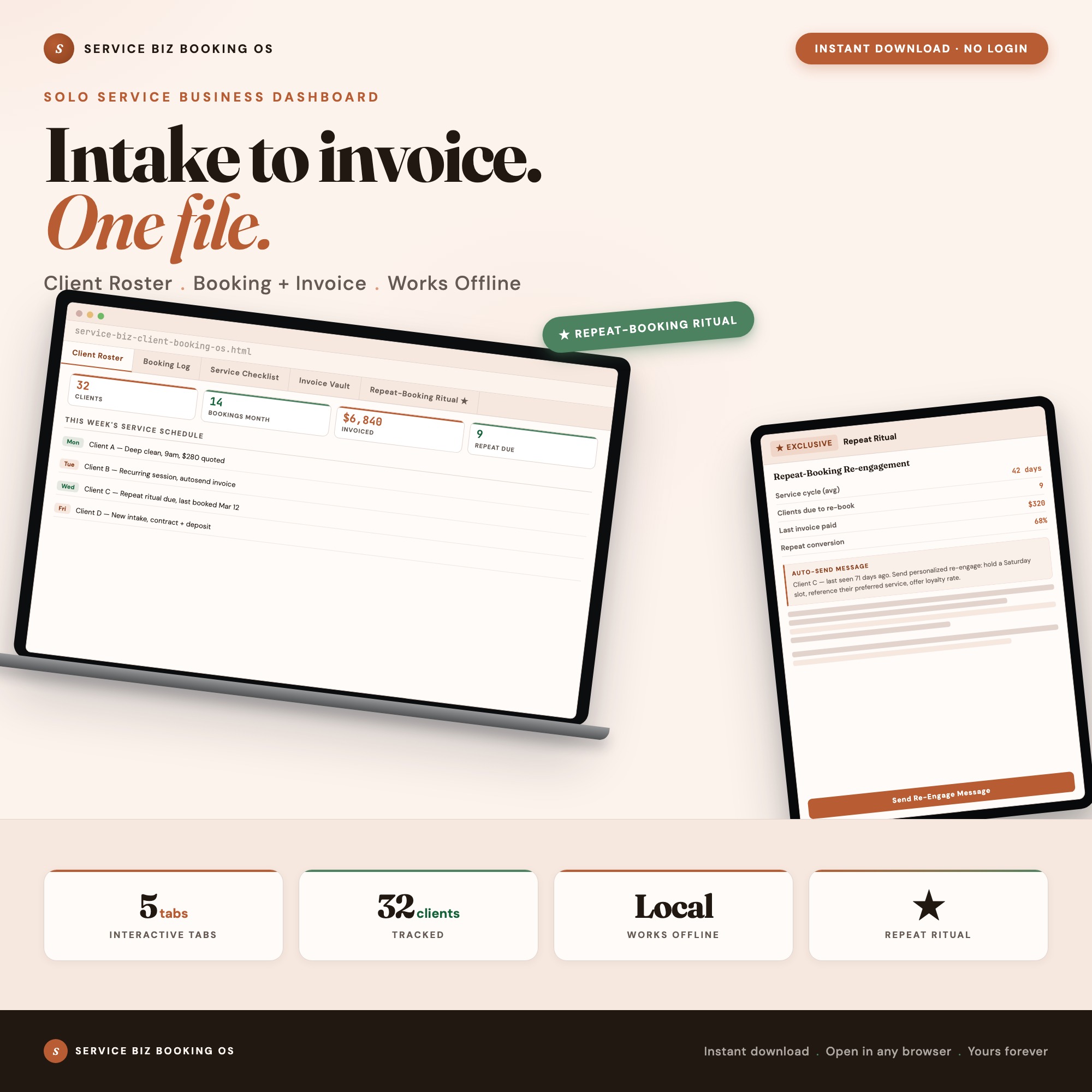
A purpose-built dashboard that combines all five workflows in one place — client roster, booking log, service checklist, invoice vault, and re-booking ritual — eliminates that friction. You see the full picture for each client without switching tools.
The Service Business Client Booking Dashboard is built exactly this way: five tabs in a single HTML file, no internet connection required, data autosaved to your browser. Open it in Chrome on your laptop or iPad before a job, update it after, and close it knowing everything is current.
What the Repeat-Booking Ritual Tab Does That Nothing Else Does
Tab 5 of the dashboard is the feature that makes the whole system worth it. After you log a completed service in the Booking Log and mark the invoice paid in the Invoice Vault, the Repeat-Booking Ritual tab reads that data and generates a personalized re-engagement message for each client, timed to their service cycle.
The output is a plain-text script you paste into a text or email. It references their last service, acknowledges the timing, and suggests re-booking — all without you writing anything from scratch. No Etsy competitor ships this as an interactive feature.
Getting Started
The Service Business Client Booking Dashboard costs $22, one time. Open the HTML file in Chrome, add your first client, and your data autosaves immediately.
The five tabs cover the complete workflow: Client Roster for contact records, Booking Log for scheduling detail, Service Checklist for consistent delivery, Invoice Vault for payment tracking, and Repeat-Booking Ritual for re-engagement scripts.
No monthly fee. No login. No internet required after download.
Browse the Service Business Client Booking Dashboard on Etsy →
Frequently asked questions
- Do I need special software to use an offline dashboard?
- No. An offline HTML dashboard like the Service Business Client Booking Dashboard is a single file you open in any browser — Chrome, Edge, Safari, or Firefox. Nothing to install, no account to create.
- Is my data private if I use a browser-based dashboard?
- Yes, completely. Data stored in your browser's localStorage never leaves your device. There are no servers, no analytics, and no uploads of any kind.
- Can I back up my data?
- Yes. Every ListingResearchOS dashboard includes an Export Backup button that downloads a JSON file to your computer. Load Backup restores it on any device or browser.
- What makes an interactive HTML dashboard better than a spreadsheet?
- Spreadsheets require manual formula maintenance and lack purpose-built workflows. An interactive HTML dashboard has pre-built logic — like automated calculations — that a spreadsheet can't replicate without significant engineering work.
- How much does the Service Business Client Booking Dashboard cost?
- It is a one-time purchase of $22 on Etsy. No monthly subscription. Once you buy it, it is yours forever.
Ready-made dashboards
Skip setup — grab an interactive dashboard built for this exact workflow.
ListingResearchOS Shop
All dashboards — one-time purchase, yours forever
Single HTML files. No subscriptions. No login. Works offline in any browser.
Browse all dashboards →