
Cozi vs. FamilyWall vs. Offline Family Dashboard: Which Survives the Week?
Comparing Cozi, FamilyWall, and an offline family dashboard for working parents: real feature gaps, subscription costs, and what none of them track.
Published June 3, 2026
Our verdict
For dual-income working parents of children ages 0-8, the Calm Family OS at $22 one-time replaces Huckleberry's wake-window calculator, Cozi's family calendar, and Eve Rodsky's Fair Play card deck in one offline browser file grounded in four research frameworks.
Cozi and FamilyWall solve one piece of the working-parent coordination problem — the shared calendar. But for parents of children ages 0-8, the coordination problem is actually four problems at once: sleep schedules, household mental load, behavioral patterns, and family rhythm. Here is how each tool handles that reality.
Cozi: Good Calendar, Thin Everything Else
Cozi is the most-used family organization app for a reason: it is easy. Shared calendar, shopping lists, family to-do lists, meal planning, and recipe storage. The free tier is functional. Cozi Gold adds features for $29.99/year.
What Cozi does not do: sleep tracking, wake-window guidance, mental-load distribution, behavior pattern logging, or any of the research-backed frameworks that pediatric sleep and parenting researchers have developed for young families. It is a calendar and list app that happens to be family-shared.
FamilyWall: Calendar Plus Photos, Still Missing the Science
FamilyWall adds photo sharing and family albums alongside scheduling. Premium plans run $4.99-$9.99/month. For families who want a combined calendar and memory platform, it fills that niche.
Like Cozi, FamilyWall has no sleep science integration, no mental-load tracking, and no predictable routine framework. The family management problem it solves is logistics coordination, not the deeper stress drivers that affect working parents of young children.
Huckleberry: Sleep Science at a Subscription Price
Huckleberry is purpose-built for baby and toddler sleep — wake-window calculations, nap tracking, and smart sleep schedule recommendations. It is the best consumer app for this specific problem. The cost is $69.99/year for the Plus plan.
For parents with multiple children or who want to move off subscriptions, that is a meaningful ongoing cost for a single feature.
What the Calm Family OS Provides
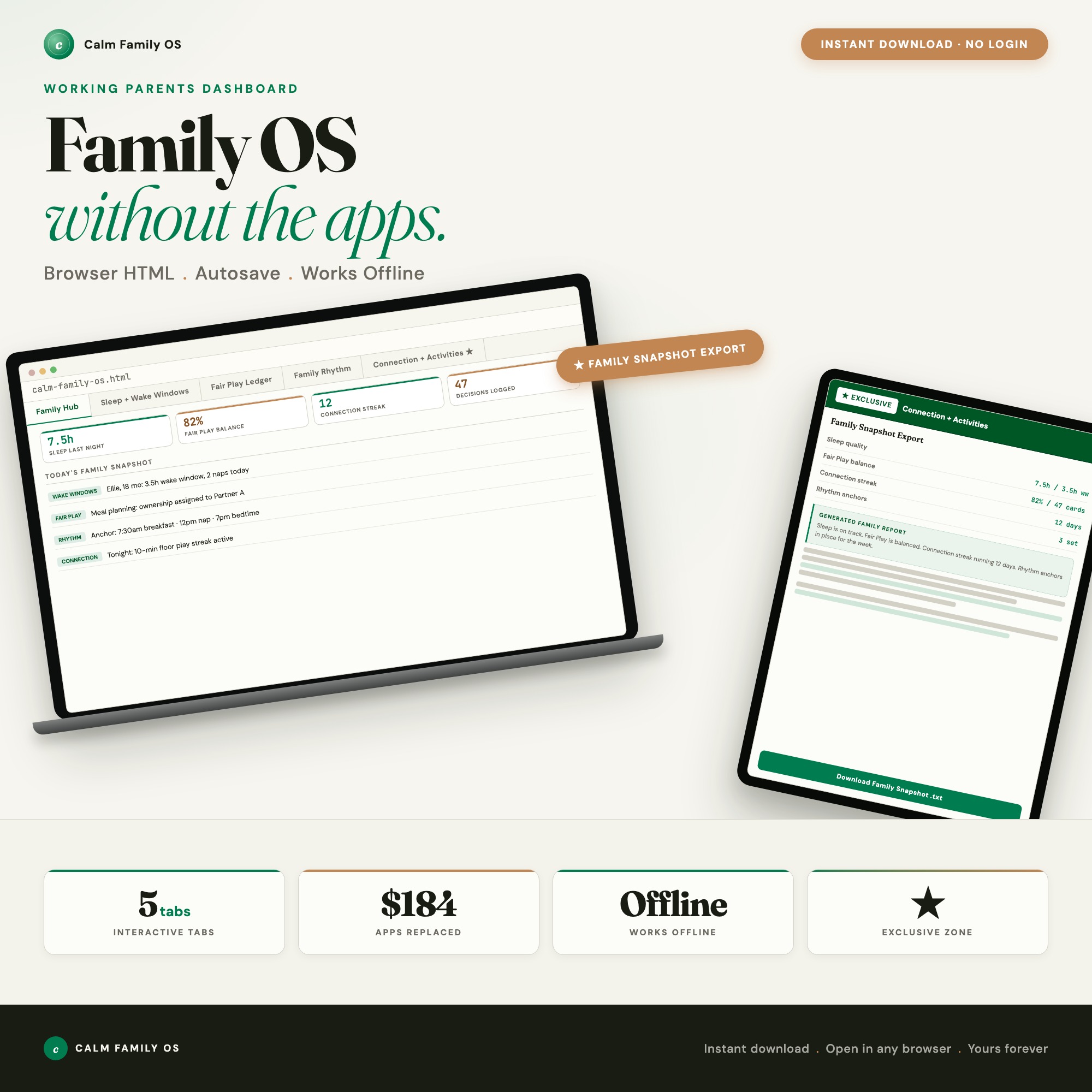
The Calm Family OS is a browser-native dashboard built on four research frameworks, in a single HTML file at $22 one-time.
Sleep and Wake Windows (Tab 2): Grounded in Polly Moore’s wake-window research, Harvey Karp, and Jodi Mindell. Input your child’s age, get the exact wake window, nap count, and bedtime target. 30-day sleep pattern log. No subscription. No Huckleberry.
Fair Play Ledger (Tab 3): Eve Rodsky’s 100-card CPE framework built in. Assign Conception, Planning, and Execution ownership per household domain. Watch your household balance score update as you make assignments. This is the mental-load conversation made visible.
Family Rhythm (Tab 4): Harvard Center on the Developing Child research links predictable anchor routines to lower cortisol in both parent and child. Build your weekly routine with morning, transition, meal, and bedtime anchors. Behavior pattern tracker logs the four triggers (sleep, hunger, transition, sensory) before each difficult moment.
Connection and Activities (Tab 5, exclusive): Screen-free activity generator reads your child’s age from Tab 1, plus current weather, energy, and mood, to suggest three ready-to-start activities. One-click Family Snapshot export assembles sleep data, Fair Play score, rhythm anchors, and decision log into a plain-text report for a pediatrician or partner conversation.
The Push Notification Problem
One underdiscussed issue with every family management app is that they are built around engagement mechanics. Push notifications, daily reminders, streak counters — these increase session frequency and user retention, which matters for subscription businesses. For working parents who are already managing screen time and attention, adding another push-notification source into the household creates the opposite of calm.
The Calm Family OS has zero push notifications by design. It is a browser file. It does not push anything to anyone. You open it when you choose to, use it, and close it. The information is available when you need it. It does not interrupt dinner. This design choice is not a limitation — it is a deliberate match with the “no phone summer” and “screen-free family” values that many parents are actively choosing.
What Each Handles
| Cozi | FamilyWall | Huckleberry | Calm Family OS | |
|---|---|---|---|---|
| Shared calendar | Yes | Yes | No | No (rhythm-focused) |
| Wake-window calculator | No | No | Yes | Yes (Polly Moore framework) |
| Mental-load tracking | No | No | No | Yes (Fair Play Ledger) |
| Behavior pattern log | No | No | No | Yes |
| Annual cost | Free-$30 | Free-$120 | $70 | $22 one-time |
| Data on your device | No (cloud) | No (cloud) | No (cloud) | Yes (localStorage) |
If you primarily need a shared family calendar, Cozi’s free tier covers it. If your children are ages 0-8 and the stress is coming from sleep schedules, uneven mental load, and unpredictable routines, the Calm Family OS brings four research frameworks into one offline file for less than the cost of two months of Huckleberry Plus. Available at ListingResearchOS on Etsy.
Frequently asked questions
- Is Cozi free?
- Cozi has a free tier with ads. Cozi Gold ($29.99/year) removes ads and adds features including recipe box and shopping list sync. The free tier is functional for basic family calendar use.
- What does FamilyWall do that Cozi does not?
- FamilyWall emphasizes photo sharing and family memory features alongside scheduling. Cozi is more task and shopping list focused. Neither handles sleep science, mental load tracking, or the behavior pattern tools that working parents with young children most need.
- What is Huckleberry used for?
- Huckleberry is a baby and toddler sleep app with a wake-window calculator, sleep tracking, and smart schedule recommendations. The Plus plan is $69.99/year. The Calm Family OS includes a research-grounded wake-window calculator (Polly Moore / Harvey Karp framework) without the subscription.
- What is the Fair Play Mental-Load Ledger?
- Based on Eve Rodsky's 100-card CPE framework, it assigns household task ownership across Conception, Planning, and Execution — showing who is carrying the cognitive load, not just who does the physical task. The Calm Family OS includes a Fair Play Ledger tab that calculates your household balance score.
- Does the Calm Family OS work for children over age 8?
- The wake-window calculator and screen-free activity generator are calibrated for children ages 0-8. The Family Rhythm, Fair Play Ledger, and Harvard CDC predictable routine tools work for families with children of any age.
The winner: interactive dashboards
No spreadsheet. No subscription. One HTML file that runs offline in your browser.
ListingResearchOS Shop
Stop comparing — start using
Interactive dashboards. One-time purchase. No subscriptions. Works offline.
Browse all dashboards →