
Quarterly Sprint Planning System for Entrepreneurs
Build a quarterly sprint system that actually executes. Real steps, the 12-week framework explained, and one tool purpose-built to score your progress.
Published June 3, 2026
Most entrepreneurs plan in years but execute in days. The mismatch is the problem. Annual goals are too distant to feel urgent; daily tasks are too granular to tell you whether you are actually moving. The quarterly sprint — specifically the 12-week sprint popularized by Brian Moran’s The 12 Week Year — closes that gap by treating each quarter as its own complete year.
This guide walks through how to build and run a quarterly sprint system that actually sticks.
Why Annual Planning Quietly Fails
A 12-month horizon creates a cognitive trap. With 11 months remaining, there is always time to start later. Urgency does not arrive until Q4, and by then the year is already decided. Entrepreneurs who plan annually report the same pattern: strong January, strong November, flat middle.
A 12-week sprint resets the math. There is no Q4 bailout. Week 1 and Week 12 are equally visible. Every week of inaction costs you roughly 8% of the sprint — and that number is easy to feel.
The Four Elements of a Functioning Sprint System
Three goals maximum, with measurable targets
Vague commitments do not survive a sprint. “Grow revenue” fails. “Close 4 new clients at $3,000 each before Week 12” passes the test. Each goal needs a number, a deadline, and a clear yes/no outcome.
Limit yourself to three. Not five, not seven — three goals that actually move your business forward. If you have more than three urgent priorities, that is a prioritization problem, not a planning problem.
Weekly tactics mapped to each goal
The 12-week framework makes a specific distinction: tactics are the lead measures that drive outcomes. Your goal is to close 4 clients. Your tactic is to send 10 cold outreach messages every Monday. The tactic is within your control; the outcome follows.
Map 2-4 weekly tactics per goal before the sprint begins. These become your weekly scorecard items — the actions you check off (or do not) each week.
A weekly execution score
Every Friday, score your week. Count how many tactics you completed versus committed. A week where you completed 8 of 10 tactics is an 80% execution week. The target is to average 85% or above across the 12 weeks.
This number does more psychological work than any motivational system. When you see a 60% week, you do not need a coach to tell you something went wrong. The score makes the problem concrete and actionable.
A sprint debrief before starting the next one
Most entrepreneurs abandon the 12-week system after sprint 1 because starting over feels like resetting to zero. It does not — but only if you do a structured debrief that carries forward what you learned.
The debrief should answer four questions: What did you complete? What blocked you? What would you do differently? What should seed the next sprint?
How to Structure Your First Sprint
Week 0 (before the sprint starts): Set 3 goals with measurable targets. Map 2-4 tactics per goal. Write down your “why” for each goal. This is the Vision tab work.
Weeks 1-12: Every Sunday evening, review last week’s tactic completion and score it. Every Monday morning, open your Daily Check-In and review today’s tactics. Do not add new goals mid-sprint.
Week 4 and Week 8: Mid-sprint checkpoints. Are you on pace? If not, adjust your tactics — not your goals. Changing goals mid-sprint invalidates the scoring.
Week 13: Full debrief. Write wins, blockers, lessons, and stop/start/continue. Seed the next sprint from what you captured. Do not skip this step — it is what separates people who run one sprint from people who build a compounding system.
The Tool Built for This Framework
You can run a quarterly sprint in a text document. But the friction of calculating execution scores manually and rebuilding the structure each sprint is exactly what makes the system collapse.
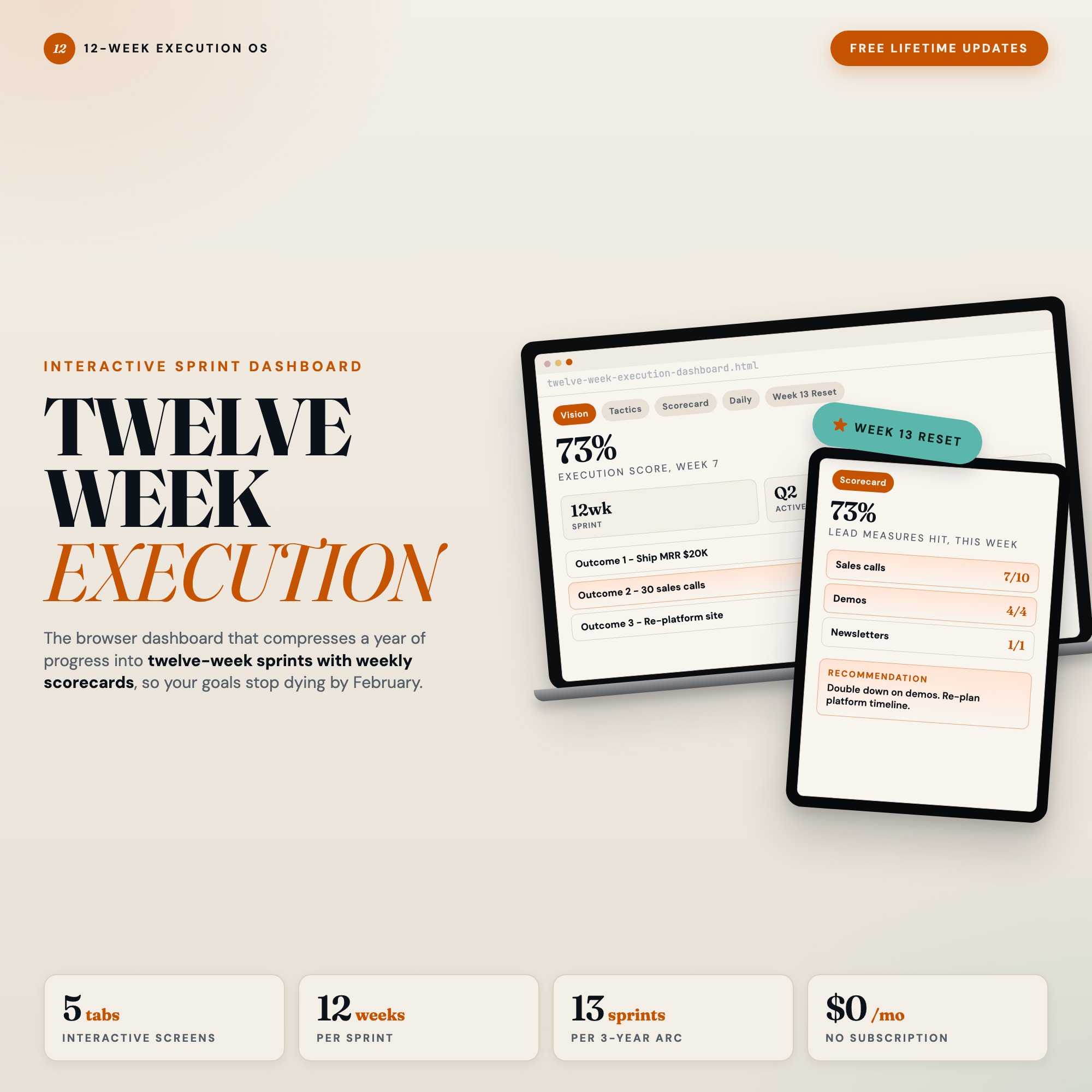
The 12 Week Execution Dashboard is a single HTML file built specifically for this framework. Open it in Chrome. Set your 3 goals in the Vision tab. Map weekly tactics in the Tactics tab. Your execution score calculates itself every week in the Weekly Scorecard. A Daily Check-In tab keeps each morning focused on your top 3 priorities and today’s lead measures.
The differentiating feature is the Week 13 Reset tab — the only planner on Etsy with this built in. After your 12-week sprint ends, Week 13 walks you through a structured debrief: wins, blockers, lessons, stop/start/continue. Then it auto-seeds your next sprint from what you captured. The reason most people abandon the framework after sprint 1 is that restarting is hard. Week 13 removes that friction permanently.
At $22 one-time, no subscription, no install — just open in Chrome and start your first sprint.
The Most Common Setup Mistakes
Setting outcome goals as tactics. “Close 4 clients” is not a tactic — it is a result. “Send 10 outreach messages per week” is a tactic. If you cannot control whether it happens on any given day, it is not a tactic.
Tracking too many metrics. Entrepreneurs layer in revenue dashboards, email open rates, and social follower counts alongside sprint tactics. Separate those. Your sprint scorecard tracks tactics only.
Treating a bad week as a reason to restart. A 40% execution week is information, not a verdict. The system only works if you score bad weeks honestly and continue. Entrepreneurs who restart after poor weeks never build the compounding advantage the framework promises.
Getting Started
If you have never run a 12-week sprint before, start with one goal, not three. Pick the one outcome that would make the next 12 weeks feel like a success if nothing else happened. Define two weekly tactics. Score yourself every Friday.
After one sprint, you will understand why the scoring matters and why the debrief unlocks the next sprint. Add the second and third goals in sprint 2.
The 12 Week Execution Dashboard is available on Etsy for $22 — download the file, open in Chrome, and start your first sprint today.
Frequently asked questions
- Do I need special software to use an offline dashboard?
- No. An offline HTML dashboard like the 12 Week Execution Dashboard is a single file you open in any browser — Chrome, Edge, Safari, or Firefox. Nothing to install, no account to create.
- Is my data private if I use a browser-based dashboard?
- Yes, completely. Data stored in your browser's localStorage never leaves your device. There are no servers, no analytics, and no uploads of any kind.
- Can I back up my data?
- Yes. Every ListingResearchOS dashboard includes an Export Backup button that downloads a JSON file to your computer. Load Backup restores it on any device or browser.
- What makes an interactive HTML dashboard better than a spreadsheet?
- Spreadsheets require manual formula maintenance and lack purpose-built workflows. An interactive HTML dashboard has pre-built logic — like the Week 13 Reset tab that distills wins and blockers then auto-seeds the next 12-week sprint with one click — that a spreadsheet can't replicate without significant engineering work.
- How much does the 12 Week Execution Dashboard cost?
- It is a one-time purchase of $22 on Etsy. No monthly subscription. Once you buy it, it is yours forever.
Ready-made dashboards
Skip setup — grab an interactive dashboard built for this exact workflow.
ListingResearchOS Shop
All dashboards — one-time purchase, yours forever
Single HTML files. No subscriptions. No login. Works offline in any browser.
Browse all dashboards →