
PhD Student Productivity System: Research, TA Duties, and Coursework in One Place
How PhD students manage coursework, research hours, TA duties, and advisor meetings without losing the thread, using one semester OS for all four tracks.
Published June 3, 2026
Graduate school has a structural productivity problem that no generic planner addresses: your commitments don’t belong to a single domain. Coursework has hard deadlines from professors. Research has soft deadlines from your advisor and hard deadlines for paper submissions. TA duties have fixed hours and grading windows that appear suddenly on the syllabus. Advisor meetings get scheduled and then rescheduled and then forgotten.
Most graduate students manage this with a combination of a paper planner, a phone calendar, a half-finished Notion page, and stress. The problem isn’t effort — it’s that the tools treat each commitment separately when the real challenge is seeing all of them together.
This guide covers how to build a semester productivity system that unifies all four roles and tells you what actually needs to happen in the next seven days.
Map Your Four Roles at the Start of Each Semester
Before you can manage the semester, you need to see it. On the first day of each semester, spend 30 minutes doing this inventory:
Coursework: For each class, record the instructor’s name, credit hours, major deliverable dates (papers, exams, presentations), and grade weight per assignment. Calculate your total credit load. Color-code weeks that have multiple major deadlines in the same 7-day window — those are your crunch weeks.
Research: List every active project with its current status (data collection, analysis, writing, revision), your advisor’s expectations for progress this semester, any conference or journal submission deadlines, and a weekly hour target. If you’re a second-year or later, your dissertation timeline should also appear here with milestone dates.
TA Duties: Record your TA contract hours (typically 10 or 20 hours per week), your section meeting schedule, grading deadlines for each assignment, and office hours. Note your contract cap — exceeding it can create HR complications regardless of how needed the extra work feels.
Deadlines: A single unified view of every due date across all three of the above. This is the tab you open on Sunday night to plan your week.
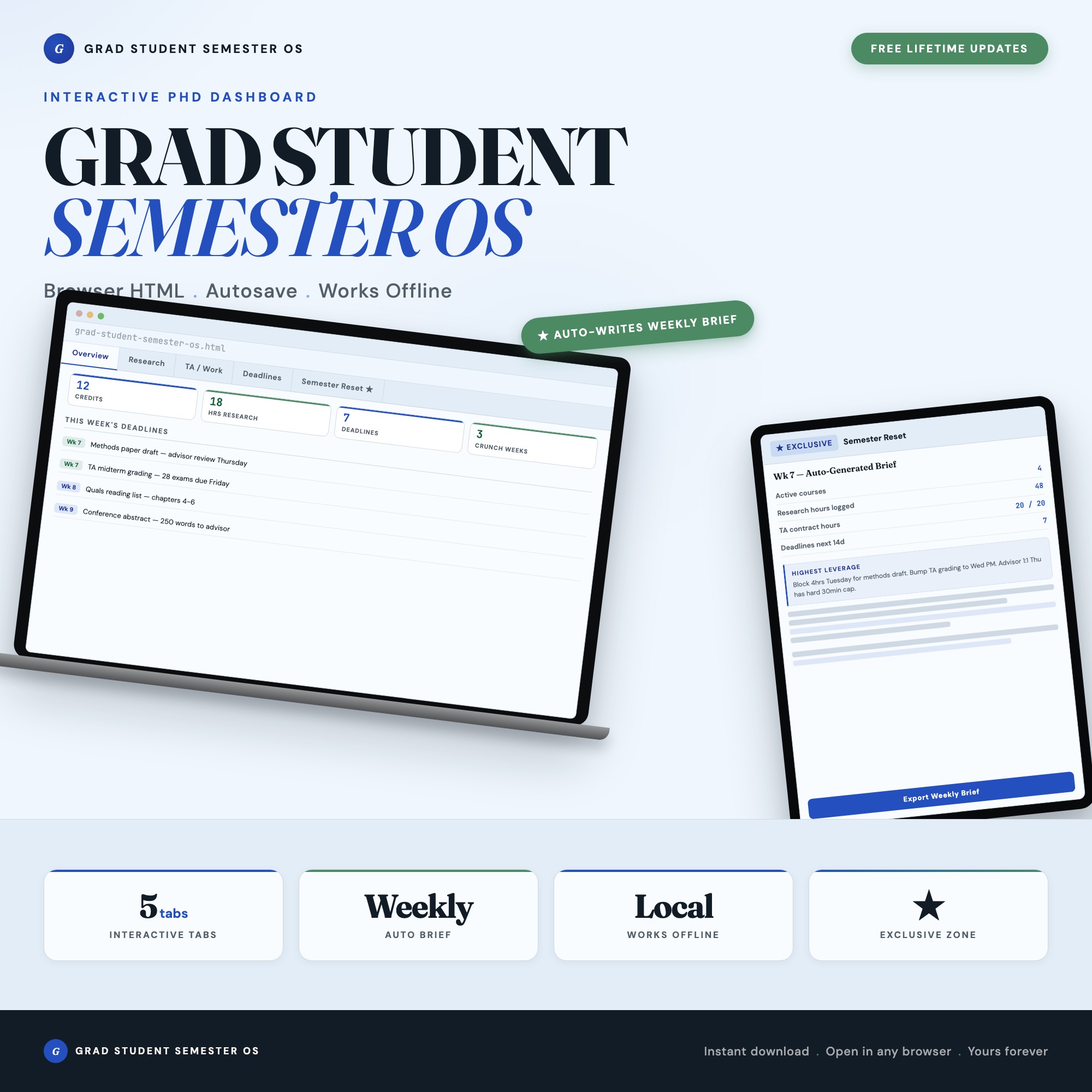
The Grad Student Semester OS has a dedicated tab for each of these four roles plus a Deadline Dashboard that surfaces everything in one timeline view, color-coded by urgency: due this week, due this month, later.
Track Research Hours Against a Weekly Target
One of the most common ways PhD students underperform is by treating research as “what happens after everything else.” Coursework and TA duties have fixed deadlines that create urgency. Research has advisor meetings that feel soft until suddenly you’re six months behind on your dissertation timeline.
The fix is treating research hours like a contract commitment. Set a weekly hour target — 15 hours is a reasonable baseline for a student also carrying 9 credits and 10 TA hours. Log every research session with:
- Date and duration
- Project
- What you accomplished — one specific sentence
After six weeks, you have a data-driven picture of whether you’re hitting your research target. If you’re consistently logging 8 hours when you need 15, that’s a conversation to have with your advisor and a schedule problem to solve — not a discipline failure to feel guilty about.
Manage Advisor Meetings with a Communication Log
The most expensive productivity failure in a PhD program is going three months without a substantive advisor meeting. Advisors who don’t hear from you assume you’re making progress or don’t need help. Neither assumption benefits you.
For each advisor meeting:
- Date scheduled
- Date held — if you cancelled and rescheduled, note both
- Topics discussed
- Action items you committed to
- Next meeting target date
This log serves two purposes: it keeps you accountable to following through on what you said you’d do, and it proves to your advisor that the relationship is active and productive. In programs where advancement decisions partly depend on advisor impressions of student engagement, this record is not trivial.
The Semester Reset: Know Your Crunch Weeks Before They Hit
At the start of weeks 4, 8, and 12 of a typical 16-week semester, spend 15 minutes asking:
- What major deadlines hit in the next three weeks?
- Which advisor meetings are overdue or haven’t been scheduled?
- What is the single highest-leverage thing I could accomplish in the next seven days?
This is the Semester Reset — the practice that keeps your planning connected to your actual semester conditions rather than the theoretical semester you planned in August.
The Grad Student Semester OS includes a Semester Reset Generator that reads your logged courses, research hours, TA shifts, and deadlines, then assembles a personalized week-by-week brief: your three crunch weeks, overdue advisor touch-points, and top-priority task for the next 7 days. It exports as Markdown so you can paste it into your notes or share it with your advisor. No other planner on Etsy generates this from your actual data.
One-time purchase at $22. Find the full collection at ListingResearchOS on Etsy.
Frequently asked questions
- Do I need special software to use an offline dashboard?
- No. An offline HTML dashboard like the Grad Student Semester OS is a single file you open in any browser — Chrome, Edge, Safari, or Firefox. Nothing to install, no account to create.
- Is my data private if I use a browser-based dashboard?
- Yes, completely. Data stored in your browser's localStorage never leaves your device. There are no servers, no analytics, and no uploads of any kind.
- Can I back up my data?
- Yes. Every ListingResearchOS dashboard includes an Export Backup button that downloads a JSON file to your computer. Load Backup restores it on any device or browser.
- What makes an interactive HTML dashboard better than a spreadsheet?
- Spreadsheets require manual formula maintenance and lack purpose-built workflows. An interactive HTML dashboard has pre-built logic — like Semester Reset Generator — reads all 4 tabs and assembles personalized weekly brief: crunch weeks, overdue advisor meetings, highest-leverage task — that a spreadsheet can't replicate without significant engineering work.
- How much does the Grad Student Semester OS cost?
- It is a one-time purchase of $22 on Etsy. No monthly subscription. Once you buy it, it is yours forever.
Ready-made dashboards
Skip setup — grab an interactive dashboard built for this exact workflow.
ListingResearchOS Shop
All dashboards — one-time purchase, yours forever
Single HTML files. No subscriptions. No login. Works offline in any browser.
Browse all dashboards →