
How Foster Parents Organize Records for Court Hearings
What foster parents need to bring to court hearings and how to organize child records, contacts, visitation logs, and medical history for juvenile court.
Published June 3, 2026
Foster parents are expected to be credible advocates in juvenile court hearings. That means arriving with organized, accurate records covering the child’s medical status, school placement, therapy attendance, visitation history, and any concerning events since the last hearing. Most foster parents do this from a 3-ring binder that’s six months out of date.
Here’s how to organize records so that court hearing prep takes 20 minutes instead of a Sunday afternoon.
What Juvenile Court Actually Needs From Foster Parents
Courts want specific, chronological documentation, not a general impression. The judge and attorneys need to understand:
- What has changed for this child since the last hearing
- Whether the case plan is being followed (visits, services, school)
- Whether there are any urgent concerns that need the court’s attention
- What the foster parent is requesting, if anything
That information lives across your phone, your email, the CPS portal, and your memory. Getting it organized before every hearing is the work most foster parents do the hard way.
The Five Categories of Foster Care Records
1. Child Roster and Case Information
For each placement, maintain a record card with: placement date, age, primary caseworker, court case number, current school, medical provider, therapy provider, and placement notes. This is the starting point for every other part of the system.
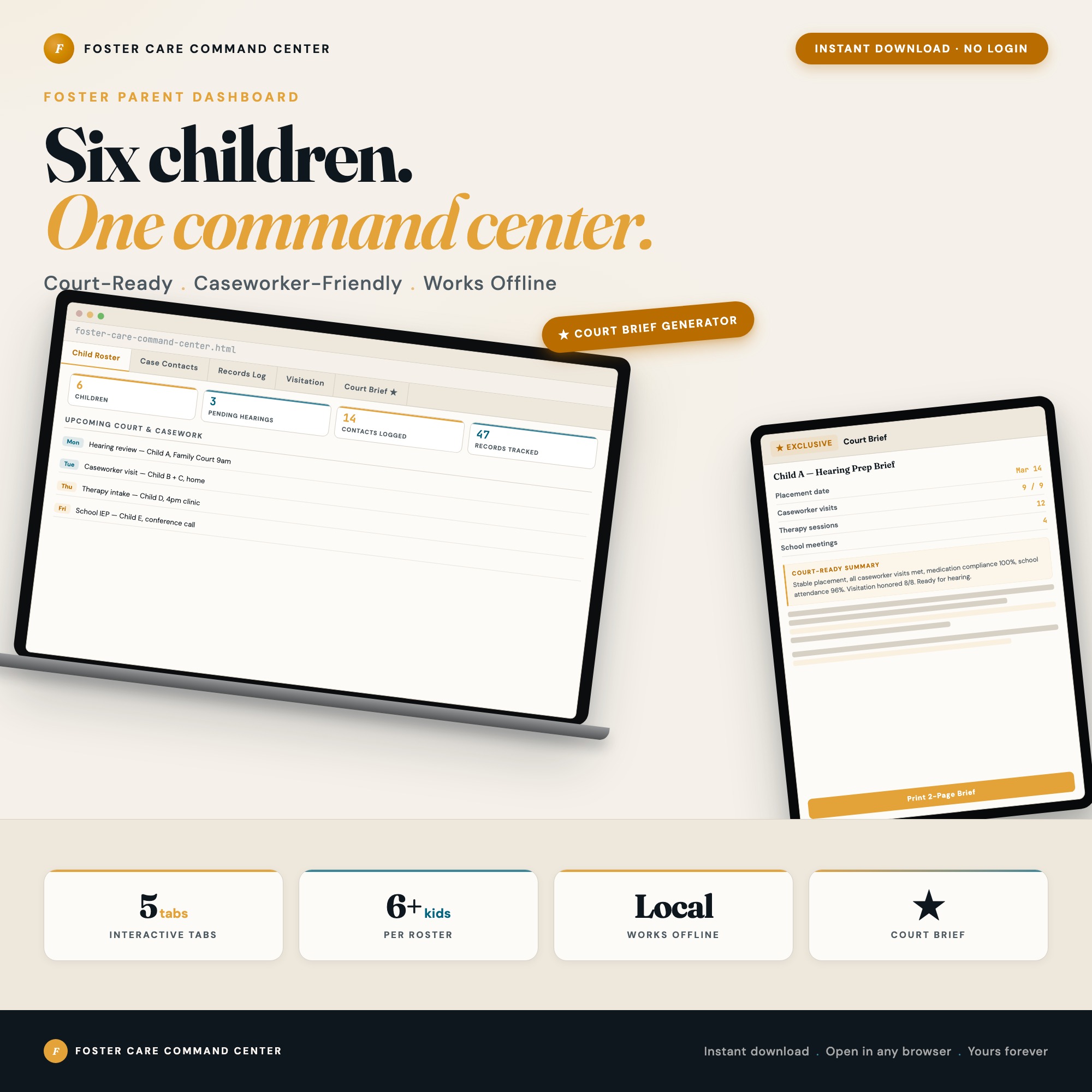
The Child Roster tab in the Foster Care Command Center tracks up to 8 children, with overview stats showing active placements, pending hearings, upcoming appointments, and total visit hours logged.
2. Case Contacts Directory
CPS caseworkers change. Attorneys change. CASA volunteers rotate. Each time a contact changes, the gap between who’s in your old records and who’s actually managing the case creates confusion.
Your contact directory needs: every person connected to each child’s case — CPS caseworkers, attorneys, CASA volunteers, therapists, teachers, pediatricians — with their current role, phone, email, and office. Contacts should link to the specific child they serve. When a caseworker changes, you update one record and it propagates correctly.
3. Records Log: Everything, Chronologically
Every event that matters should be logged with: type of event (medical / school / therapy / court / caseworker visit / home study), date, outcome, and notes. This log needs to be filterable so you can pull all therapy sessions for a specific child from the last 90 days in 30 seconds, not 30 minutes.
What to log:
- Medical appointments: what happened, any new prescriptions, referrals made
- School meetings: IEP updates, behavioral reports, teacher concerns
- Therapy sessions: attendance (compliant or missed), provider notes
- Caseworker visits: what was discussed, any plan changes, date of next contact
- Court hearings: what was decided, next hearing date, any conditions set
- Significant behavioral or health events that the court should know about
4. Visitation Tracker
Visitation compliance is a central issue in most foster cases. Courts want to know: how many visits were scheduled, how many occurred, who attended, and what the child’s behavior was before and after.
Log each visit with: scheduled date, whether it occurred, duration, who attended from the bio family, behavioral notes before and after, and any CASA notes. Missed visits should flag automatically for the hearing brief.
5. Court Hearing Prep Brief
This is the output the entire system builds toward. Before each hearing, you need a concise document that covers: who the players are, what has changed since the last hearing, the current status of school, medical, and therapy, the visitation record, and what the foster parent wants the court to know.
Writing this from scratch before every hearing takes hours and produces uneven quality. The Court Hearing Prep Brief generator in the Foster Care Command Center reads your child’s data across all four tabs and produces a structured 2-page brief: case players, status since last hearing, outstanding concerns, foster parent position statement, and a chronological event timeline. You print it, bring it, hand it to your attorney.
This is not a template you fill out by hand. It’s a generator that reads your own logged records and produces a hearing-specific document for each child.
Managing Multiple Placements
Foster parents managing more than one placement face a compound version of the same problem: each child has separate caseworkers, separate court timelines, separate therapy schedules, and separate visitation logistics. The records for child A and child B need to be completely separate but manageable from the same system.
The Foster Care Command Center handles up to 8 children, each with their own record card and their own contacts and records log. The Court Hearing Brief generator is child-specific: you select the child and the hearing date, and the output is for that child’s case, not a generic document.
Everything stays in your browser. Nothing is uploaded to any server. Your children’s private medical and case records stay on your device. $27 one-time, no subscription.
Frequently asked questions
- What records should a foster parent bring to a court hearing?
- Bring a summary of significant events since the last hearing: medical appointments, school status, therapy attendance, visitation schedule and any missed visits, and any notable changes in the child's condition or behavior. Courts appreciate organized, specific documentation rather than a stack of printouts.
- How do foster parents track information when caseworkers keep changing?
- Caseworker turnover is one of the most common frustrations in foster care. The solution is keeping your own contact directory where each contact links to the specific child they serve — so a caseworker change updates everywhere automatically and nothing falls through the cracks.
- What should be logged in a foster care records system?
- Log every event that matters: medical appointments with outcomes, school meetings and IEP updates, therapy sessions and provider notes, caseworker visits with what was discussed, court hearings with what was decided, and any home study updates. The log needs to be filterable by child, type, and date range.
- How does the Court Hearing Prep Brief generator work?
- You select a child and an upcoming hearing date. The generator reads that child's contact directory, recent records log, current school and medical status, and visitation history from your saved data. It outputs a structured 2-page hearing brief: case players, status since last hearing, outstanding concerns, and a chronological event summary. You print it and bring it to court.
- How much does the Foster Care Command Center cost?
- One-time purchase of $27 on Etsy. No subscription, no login required. Everything stays on your device.
Ready-made dashboards
Skip setup — grab an interactive dashboard built for this exact workflow.
ListingResearchOS Shop
All dashboards — one-time purchase, yours forever
Single HTML files. No subscriptions. No login. Works offline in any browser.
Browse all dashboards →