
Notion vs Scrivener for Writing a Novel (and What Neither Tracks)
Scrivener is built for drafting a long manuscript; Notion for organizing everything around it. Which to use, where each breaks, what to track either way.
Published June 3, 2026
Our verdict
Scrivener remains the best pure drafting environment for complex manuscripts. But if you need word-count tracking, chapter status, a character bible, AND an agent query funnel in one place — and you don't want another software license — the Author Manuscript Dashboard covers the full picture at $22 one-time.
The writing tool debate among novelists has been going on for years, and the honest answer is that Scrivener, Notion, Google Docs, and Ulysses solve different problems. If you’re a first or second-novel writer tracking a 70–90K manuscript through drafting, revision, and the agent query process, here’s what each tool actually does — and where each one falls short.
What Writing Tools Are Actually For
These tools fall into two categories:
- Drafting environments: Scrivener, Ulysses, Google Docs — where you write the actual words
- Tracking and management: Notion, spreadsheets, the Author Manuscript Dashboard — where you track progress, status, and the submission process
Most writing tool debates conflate these two jobs. Scrivener is the best drafting environment for complex manuscripts. But Scrivener doesn’t track your agent query response rates or tell you which chapter is in revision vs. cleared. That’s a different problem.
Scrivener: The Drafting Standard
Scrivener ($59 one-time for desktop) has been the novelist’s drafting tool of choice for 15 years. Its corkboard view, scene-level organization, split-screen mode, and compile-to-manuscript function are unmatched for long-form structural work. If you’re writing a complex multi-POV novel with acts, scenes, and research materials, Scrivener’s organizational features genuinely help.
Where it falls short: Scrivener is built around document structure, not progress tracking. There’s no streak counter that celebrates your daily word count, no chapter status board showing which chapters are drafted vs. revised, and no query tracker for when you start submitting to agents. The iOS version is a separate purchase, and cloud sync requires Dropbox.
Best for: Writers who need deep structural organization for complex manuscripts.
Notion: Flexible but Requires Significant Configuration
Notion is powerful enough to build anything — including a full manuscript tracker, chapter status board, and agent query log. The problem is you have to build it yourself. A Notion writing database with the right properties, views, and linked databases takes hours to configure, and most writers who start this project abandon it before they finish drafting chapter 3.
Notion also requires an internet connection (partial offline support exists but is unreliable), costs $10–$20/month for a personal plan, and stores everything on Notion’s servers.
Best for: Writers who enjoy building systems and already use Notion for other work.
Google Docs: The Default Drafting Option
Google Docs is free, familiar, and excellent for drafting. It has no structural features for long manuscripts — you’re writing in one long document or breaking things into separate files manually. It doesn’t track word counts per chapter, it has no chapter status system, and it has no query tracking.
Most writers use Google Docs for drafting and then find they have no system for the rest of the process.
Best for: Writers who want a free, cloud-synced drafting environment and manage everything else separately.
Ulysses: The Apple Ecosystem Writing App
Ulysses ($5.99/month) is the cleanest writing environment for Apple users. Markdown-native, beautiful typography, seamless iCloud sync across Mac, iPhone, and iPad. It has sheet organization for managing scenes and chapters, and a goal-tracking feature for daily word counts.
Where it falls short: Ulysses is writing-focused, not tracking-focused. It has no agent query functionality, no character bible, no plot beat tracker. It’s a premium drafting environment, not a manuscript management system.
Best for: Apple-ecosystem writers who want the cleanest possible drafting experience and don’t mind the subscription.
Author Manuscript Dashboard: The Full-Cycle Tracking Tool
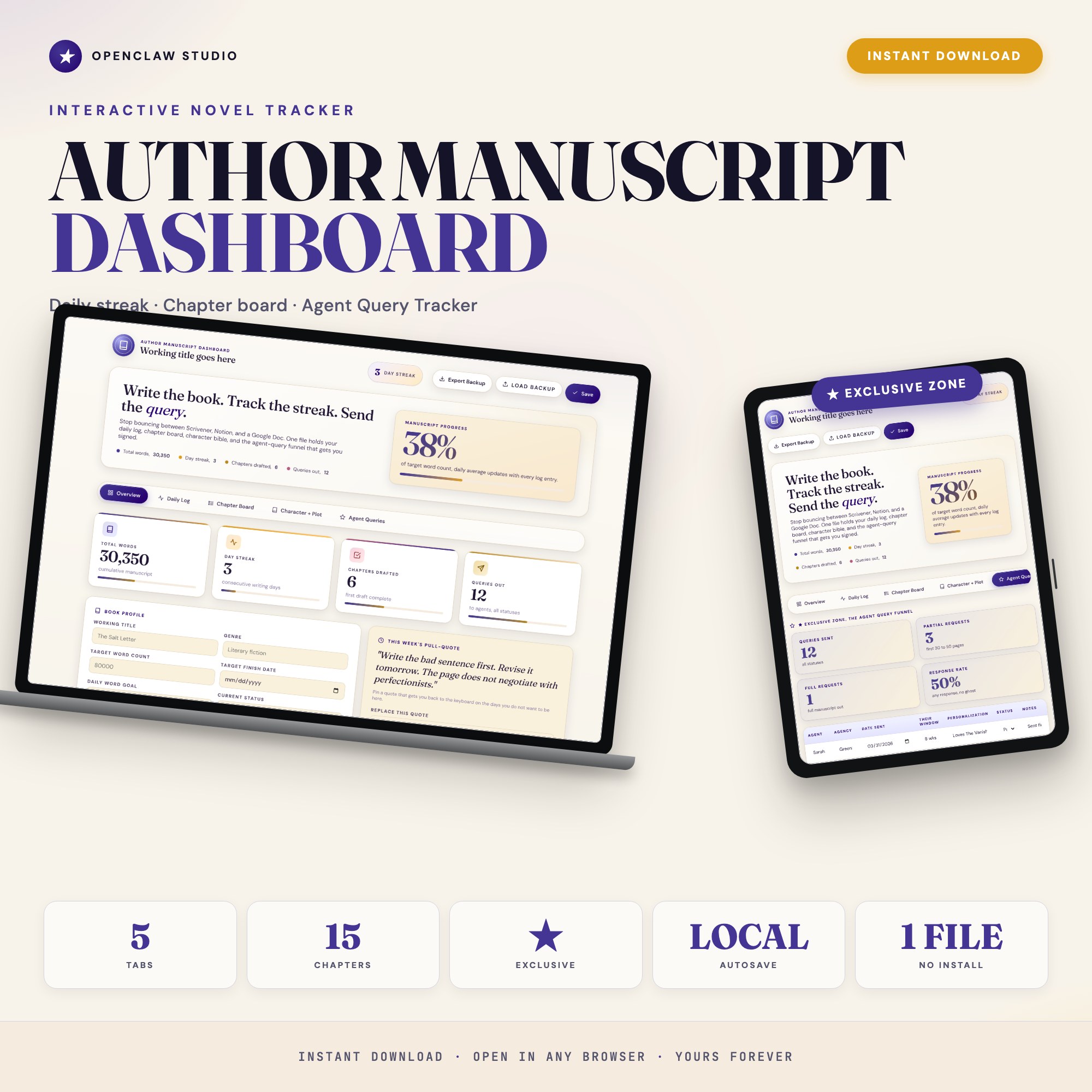
The Author Manuscript Dashboard is a single offline HTML file that covers what the drafting tools don’t: an Overview with your total word count and daily streak, a Daily Log that records each session’s word count and mood, a Chapter Board with status tracking (outlined / drafted / revised / final), a Character + Plot Bible for reference, and the Agent Queries tab.
The Agent Queries tab (Tab 5) is the standout feature. It’s built as a submission funnel: every query enters with the agent name, agency, date sent, response window, and status field. The tracker rolls it all into a response-rate rollup that tells you whether your query letter is working. Writers who have sent 30–40 queries and don’t know if they’re getting partials at an average rate are flying blind. This tab fixes that.
At $22 one-time, it costs less than four months of Ulysses. Works offline, no account required, everything autosaves in your browser.
Best for: First and second-novel writers who want word-count tracking, chapter status, a character bible, and an agent query funnel in one place.
The Honest Take
Most novelists need both a drafting tool and a tracking tool. Scrivener or Google Docs for writing the words; something built around progress and submission management for everything else.
If you want the full tracking system without a subscription, the Author Manuscript Dashboard covers the word count, chapter board, character notes, and query campaign in one offline file.
Frequently asked questions
- Should I use Scrivener or Notion for my novel?
- It depends what you need. Scrivener is a drafting environment — it excels at structuring long-form manuscripts with scenes, acts, and corkboard views. Notion is a database tool that you have to configure yourself. Neither ships with a built-in agent query tracker or word-count streak engine. If you need those alongside your manuscript management, a purpose-built writing dashboard handles what neither of them does out of the box.
- Does Scrivener have a subscription?
- Scrivener is a one-time purchase (around $59 for desktop), but Scrivener for iOS is a separate purchase and cloud sync via Dropbox requires a Dropbox account. It's not a subscription but it's not free either.
- What is Ulysses good for?
- Ulysses ($5.99/month or $49.99/year) is excellent for writers who want a clean, distraction-free environment with Markdown support and seamless iCloud sync across Apple devices. It's weaker for structural manuscript organization and has no agent query functionality.
- What does the Author Manuscript Dashboard do that the others don't?
- The Agent Query Tracker in Tab 5 is the unique feature. It tracks every query with the agent name, agency, date sent, response window, and status (no response / form pass / partial / full / offer of rep) and rolls it into a response-rate dashboard. No other writing tool ships this built-in.
- Can I use both Scrivener and the Author Manuscript Dashboard?
- Yes — many writers draft in Scrivener and use the Author Manuscript Dashboard for tracking progress, chapter status, and their query campaign. They serve different parts of the writing workflow.
The winner: interactive dashboards
No spreadsheet. No subscription. One HTML file that runs offline in your browser.
ListingResearchOS Shop
Stop comparing — start using
Interactive dashboards. One-time purchase. No subscriptions. Works offline.
Browse all dashboards →